
Today, we're diving into an intriguing Expert Advisor (EA) that has been revamped from MQL4 and originally published by Collector. If you're looking to enhance your trading strategies on MetaTrader 5, this is definitely worth a look!
The operation of this EA hinges on the Laguerre indicator. So, let’s break down how it works.
How It Works
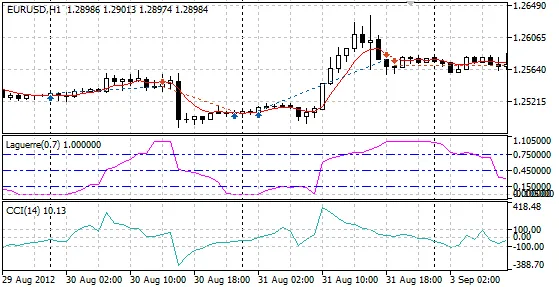
Essentially, when the Laguerre indicator hits 0, and the moving average (MA) is trending upwards with the Commodity Channel Index (CCI) below the threshold, you’ve got yourself a buy signal. Conversely, when Laguerre reaches 1, with the MA moving down and CCI above the threshold, that’s your cue to sell.
For the lot sizes, you have the flexibility to choose either a fixed amount or one that’s proportional to your free margin. Keep in mind, if trades go south, the EA can reduce the position volume to manage risks better.
A position will close when the Laguerre indicator shifts in the opposite direction. Specifically, a buy position wraps up when Laguerre exceeds 0.9, and a sell position closes when it dips below 0.1.
You can also set a Stop Loss and Take Profit for every trade. If you prefer, instead of having traditional Stop Loss and Take Profit levels, you can opt for positions to close automatically upon hitting a predefined loss or profit.
Check out the performance of this EA in action in the strategy tester's visual mode below:
Parameters
- Lots: The lot size; if set to 0, the MaximumRisk value will be applied.
- MaximumRisk: This is the risk level used when Lots=0.
- DecreaseFactor: This is the factor for reducing lot sizes after losing trades. Set to 0 to disable reduction. A lower value means a more significant reduction in lot size. If reduction is not feasible, the minimum lot size will be used.
- StopLoss: This indicates the Stop Loss in points; set to 0 for no Stop Loss.
- TakeProfit: This indicates the Take Profit in points; set to 0 for no Take Profit.
- VirtualSLTP: If you don’t want traditional Stop Loss and Take Profit, this parameter allows you to close a position when loss or profit levels, as set in StopLoss and TakeProfit parameters, are reached.
- LagGamma: The parameter for the Laguerre indicator.
- CCIPeriod: The period for the CCI.
- CCIPrice: The price to be used for CCI calculations.
- CCILevel: The threshold level for CCI.
- MAPeriod: The period for the Moving Average.
- MAShift: The shift value for the MA.
- MAMethod: The method used for the Moving Average.
- MAPrice: The price to be used for Moving Average calculations.
- Shift: This defines the bar for checking indicator values: 0 refers to the new forming bar, while 1 refers to the first completed bar.




Comments 0