
关于Exp_ColorZerolagMomentum_X2交易系统
大家好,今天来聊聊Exp_ColorZerolagMomentum_X2这个基于两个ColorZerolagMomentum指标的趋势交易系统。这个系统的第一个指标主要用来判断慢趋势的方向,依据的是主线和信号线的位置。而第二个指标则是在两条线交叉或接触时,决定何时开仓。
信号的形成是在K线收盘时,只要满足以下两个条件:
- 快趋势和慢趋势的信号一致;
- 快趋势的方向发生变化。
专家顾问的输入参数:
//| EA指标的输入参数 |
//+-------------------------------------------------+
inputstring Trade="交易管理"; //+============== 交易管理 ==============+
inputdouble MM=0.1; //每笔交易所占存款比例
input MarginMode MMMode=LOT; //手数值检测方法
inputuint StopLoss_=1000; //止损点数
inputuint TakeProfit_=2000; //止盈点数
inputstring MustTrade="交易权限"; //+============== 交易权限 ==============+
inputint Deviation_=10; //最大价格偏差点数
inputbool BuyPosOpen=true; //允许开多单
inputbool SellPosOpen=true; //允许开空单
//+-------------------------------------------------+
//| 滤波器指标的输入参数 |
//+-------------------------------------------------+
inputstring Filter="慢趋势参数"; //+============== 慢趋势参数 ==============+
inputENUM_TIMEFRAMES TimeFrame=PERIOD_H6; //1个图表周期
inputuint smoothing=15;
inputENUM_APPLIED_PRICE IPC=PRICE_CLOSE;//应用价格
//----
inputdouble Factor1=0.05;
inputuint Momentum_period1=8;
//----
inputdouble Factor2=0.10;
inputuint Momentum_period2=21;
//----
inputdouble Factor3=0.16;
inputuint Momentum_period3=34;
//----
inputdouble Factor4=0.26;
inputint Momentum_period4=55;
//----
inputdouble Factor5=0.43;
inputuint Momentum_period5=89;
inputuint SignalBar=1; //获取入场信号的K线索引
inputbool BuyPosClose=true; //允许按趋势平多单
inputbool SellPosClose=true; //允许按趋势平空单
//+-------------------------------------------------+
//| 入场指标的输入参数 |
//+-------------------------------------------------+
inputstring Input="入场参数"; //+=============== 入场参数 ===============+
inputENUM_TIMEFRAMES TimeFrame_=PERIOD_M30; //2个图表周期
inputuint smoothing_=15;
inputENUM_APPLIED_PRICE IPC_=PRICE_CLOSE;//应用价格
//----
inputdouble Factor1_=0.05;
inputuint Momentum_period1_=8;
//----
inputdouble Factor2_=0.10;
inputuint Momentum_period2_=21;
//----
inputdouble Factor3_=0.16;
inputuint Momentum_period3_=34;
//----
inputdouble Factor4_=0.26;
inputint Momentum_period4_=55;
//----
inputdouble Factor5_=0.43;
inputuint Momentum_period5_=89;
inputuint SignalBar_=1;//获取入场信号的K线索引
inputbool BuyPosClose_=false; //允许按信号平多单
inputbool SellPosClose_=false; //允许按信号平空单
//+-------------------------------------------------+
代码中的字符串参数主要用于更好地可视化专家的输入参数窗口。
EA中的ColorZerolagMomentum_HTF指标仅用于在策略测试器中更方便地可视化趋势,其他操作模式下则不活跃。
请将ColorZerolagMomentum.ex5和ColorZerolagMomentum_HTF.ex5编译后的文件放到<terminal_data_folder>\MQL5\Indicators目录下。
编译后,Exp_ColorZerolagMomentum.ex5专家文件包含ColorZerolagMomentum.ex5和ColorZerolagMomentum_HTF.ex5指标作为资源,因此它们不需要在终端文件夹中存在,编译后的EA就可以正常工作!为此,EA代码中已添加相应的代码以将这些指标包含在专家的可执行文件中。
指标的可执行文件已作为资源附加在全局范围内。
#resource "\Indicators\ColorZerolagMomentum.ex5"
#resource "\Indicators\ColorZerolagMomentum_HTF.ex5"
更改了用于OnInit()函数块中作为资源使用的指标路径字符串。
InpInd_Handle=iCustom(Symbol(),TimeFrame,"::Indicators\ColorZerolagMomentum",
smoothing,IPC,Factor1,Momentum_period1,Factor2,Momentum_period2,Factor3,Momentum_period3,Factor4,Momentum_period4,Factor5,Momentum_period5);
if(InpInd_Handle==INVALID_HANDLE)
{
Print(" 获取ColorZerolagMomentum指标句柄失败");
return(INIT_FAILED);
}
//---- 获取ColorZerolagMomentum指标的句柄
InpInd_Handle_=iCustom(Symbol(),TimeFrame_,"::Indicators\ColorZerolagMomentum",
smoothing_,IPC_,Factor1_,Momentum_period1_,Factor2_,Momentum_period2_,Factor3_,Momentum_period3_,Factor4_,Momentum_period4_,Factor5_,Momentum_period5_);
if(InpInd_Handle_==INVALID_HANDLE)
{
Print(" 获取ColorZerolagMomentum指标句柄失败");
return(INIT_FAILED);
}
if(MQLInfoInteger(MQL_VISUAL_MODE))
{
//---- 获取ColorZerolagMomentum_HTF指标的句柄
int Ind_Handle=iCustom(Symbol(),Period(),"::Indicators\ColorZerolagMomentum_HTF",TimeFrame,
smoothing,IPC,Factor1,Momentum_period1,Factor2,Momentum_period2,Factor3,Momentum_period3,Factor4,Momentum_period4,Factor5,Momentum_period5);
if(Ind_Handle==INVALID_HANDLE)
{
Print(" 获取ColorZerolagMomentum_HTF指标句柄失败");
return(INIT_FAILED);
}
//---- 获取ColorZerolagMomentum_HTF指标的句柄
Ind_Handle=iCustom(Symbol(),Period(),"::Indicators\ColorZerolagMomentum_HTF",TimeFrame_,
smoothing_,IPC_,Factor1_,Momentum_period1_,Factor2_,Momentum_period2_,Factor3_,Momentum_period3_,Factor4_,Momentum_period4_,Factor5_,Momentum_period5_);
if(Ind_Handle==INVALID_HANDLE)
{
Print(" 获取ColorZerolagMomentum_HTF指标句柄失败");
return(INIT_FAILED);
}
}
因此,专家的编译可执行文件可以在其他交易终端上单独使用,而无需依赖这些指标。
请注意,TradeAlgorithms.mqh库文件允许用户在提供非零点差的经纪商使用专家顾问,并且可以在开仓时同时设置止损和止盈。您可以在以下链接下载更多该库的变体:交易算法。
在下面的测试中使用了默认的专家顾问输入参数。测试过程中未使用止损和止盈。
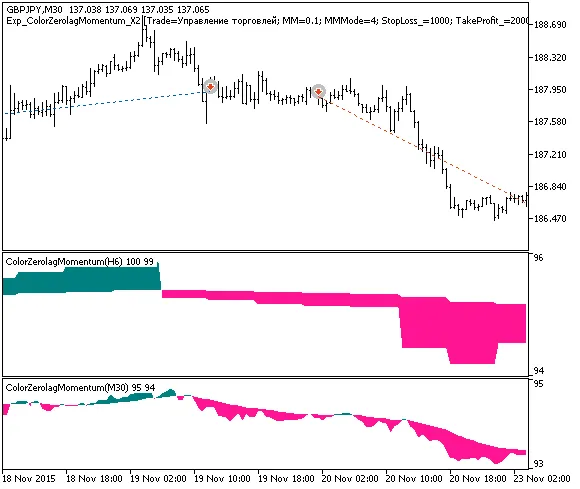
图1. 图表上的交易示例
2015年GBPJPY的测试结果,慢趋势为H6,快趋势入场为M30:
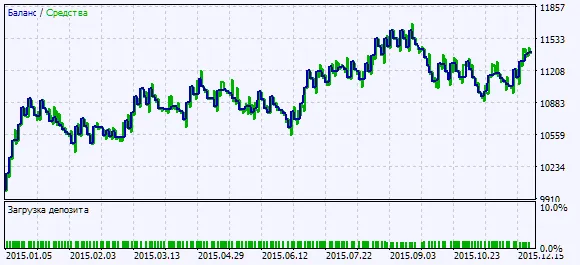
图2. 测试结果图表




评论 0