
Hey there, fellow traders! Have you ever felt like the trading world is shifting beneath your feet? As the wise old wizard once said, "I feel it in the water, I feel it in the ground, I feel it in the air." Indeed, the landscape of trading is constantly evolving, and we need to adapt to keep up!
Today, I want to introduce you to Gandalf_PRO, an Expert Advisor (EA) designed for MetaTrader 4. This EA is engineered to handle your trading decisions while you kick back and relax.
Understanding Gandalf_PRO
The concept behind Gandalf_PRO arose from discussions in this thread on MQL5.
So, what does this EA do? It opens one buy and one sell order simultaneously, managing them independently until they close with a fixed take profit (TP) or stop loss (SL).
How It Works
Gandalf_PRO bases its trading decisions on a two-parameter Exponential Smoothing Time Series model. Here’s the breakdown:
- 1st Parameter: This is the price smoothing factor (S).
- 2nd Parameter: This is the trend inclination factor (T).
The calculations are carried out using a series of recursive formulas:
S[n] = w * y[n] + (1 - w) * (S[n-1] + T[n-1])
T[n] = t * (S[n] - S[n-1]) + (1 - t) * T[n-1]
The predicted value is then calculated as:
y[n+1] = S[n] + T[n]
For the initial values of the smoothing and trend parameters, you can use factors derived from linear regression formulas, like those discussed here.
Input Variables for the EA
Now, let’s dive into the input variables for the EA:
For Long Positions:
- In_BUY: Set to true to allow long positions.
- Count_buy: This is the number of historical bars used for smoothing, set to 24.
- w_price: Price factor, set to 0.18.
- w_trend: Trend factor, also set to 0.18.
- SL_buy: Stop loss level in pips, set to 62.
- Risk_buy: Risk level in percentage, set to 0.
For Short Positions:
The variables for short positions are similar: In_SELL, Count_sell, m_price, m_trend, SL_sell, Risk_sell.
Optimization Process
Optimization of this EA occurs in two stages using a constant lot size (i.e., Risk_buy and Risk_sell set to 0).
Stage 1 - Longs:
Set In_BUY=true and In_SELL=false. Vary Count_buy from 3 to 120, w_price and w_trend from 0.05 to 0.6, and SL_buy from 30 to 100.
Stage 2 - Shorts:
Set In_BUY=false and In_SELL=true, with similar parameters as above.
Gandalf_PRO performs well in trending markets, particularly on H4 and D periods for EURUSD. However, to maximize your success, consider additional filtering using indicators on higher timeframes.
Real-World Examples
Let’s take a look at some performance reports:
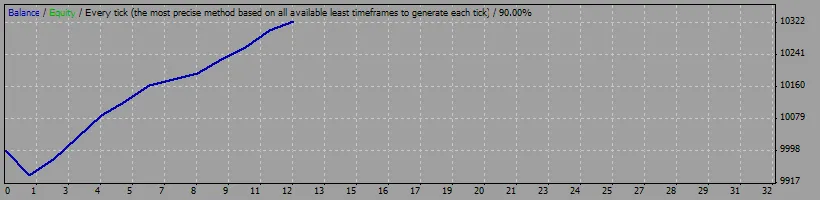
Example 1: Bullish Movement (March 9 - 20, 2009)
| Symbol | EURUSD | ||||
| Period | 4 Hours (H4) | ||||
| Model | Every tick | ||||
| Initial deposit | 10000.00 | ||||
| Total net profit | 326.02 | ||||
| Total trades | 12 | Long positions (won %) | 12 (91.67%) | ||
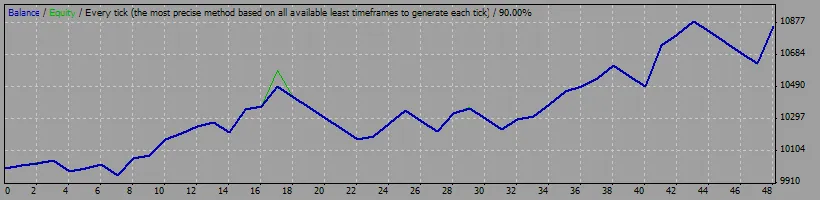
Example 2: Bearish Movement (September 24 - October 31, 2008)
| Symbol | EURUSD | ||||
| Period | 4 Hours (H4) | ||||
| Model | Every tick | ||||
| Initial deposit | 10000.00 | ||||
| Total net profit | 857.40 | ||||
| Total trades | 48 | Short positions (won %) | 48 (62.50%) | ||
In conclusion, if you're looking to enhance your trading experience, give Gandalf_PRO a try. It might just be the wizard you need in your trading toolkit!




Comments 0