
Hey fellow traders! Ever thought about how financial regulators and agencies forecast fund profits? They often share various ratings and charts to help us make informed decisions.
However, as individual traders, we primarily have access to just one chart—the agency's own quotes. This chart essentially sketches out the "future" of Forex, and that’s the one we’ll be trading off!
An example to consider: Moody's is typically ahead of Forex by about 75 minutes.
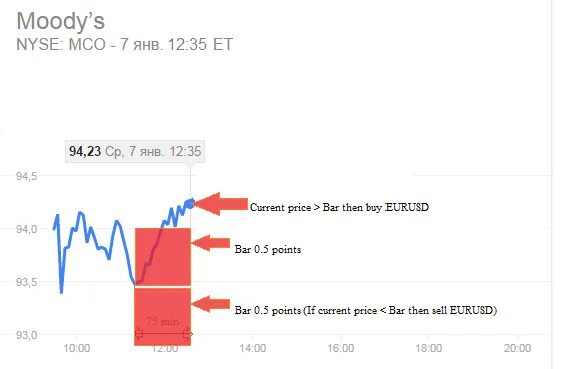
In the chart, you’ll notice that our EA (Expert Advisor) creates two bars of 0.5 points each. What it does next is intriguing: when the price breaks out of these bars, the EA logs the exact time and opens a position accordingly.
Quick Note: The bars are set for a duration of 75 minutes and they predict the "future" of Forex.
Settings for Your EA
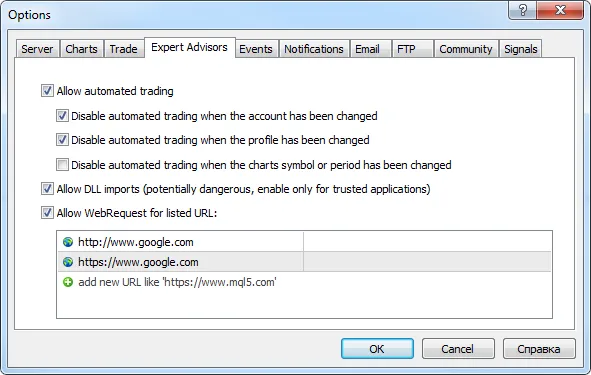
To start using the Back to the Future EA, you’ll need to configure your terminal settings. Here’s how:
- Navigate to Tools > Options > Expert Advisors.
- Adjust the options to match the settings displayed in the screenshot below:
Once everything is set up, you’ll be ready to take advantage of this innovative EA and trade with confidence!




Comments 0