
Hey fellow traders! Today, let’s dive into a straightforward method for connecting manual orders to the Strategy Tester in MetaTrader 5. As we know, ChartEvent doesn’t play nice with the Strategy Tester, leaving us with limited options. Currently, the only two objects we can use within the Strategy Tester using basic MQL5 code are the label and the button. While adding a label is a breeze, incorporating a button is trickier. Even if you manage to integrate it, detecting its state (clicked or unclicked) requires advanced programming skills and linkage to outside systems.
Here’s a nifty trick I’ve used: a simple file detection process. Think of this EA as a standalone receiver. With every tick movement, the EA checks a specific folder for a file that triggers an order. If it finds the required text file in that folder, it executes the order and then deletes the file. So, the presence of a certain file in the folder becomes the key to executing a trade.
Now, you can command the EA to execute orders by simply placing a specific file in the designated folder. For instance, using filenames like buy.txt, sell.txt, or close.txt in the ...\Commonilesolder of MetaTrader 5 will trigger the corresponding order based on the file name. These text files can be empty—the filename and its presence in the folder are what count. Make sure only one of the three files is in the folder at any given time; otherwise, the EA will execute the first file it reads and delete all three afterwards.
You’ll also need an external application to create or manage the required text files in that folder. I built mine using Visual Basic, but I can’t share the executable file here. However, you can easily create one or find a similar solution that suits your needs. Just ensure you place the command text file in the right folder. If you’re interested, I’ll share how I designed my panel in the discussion area below.
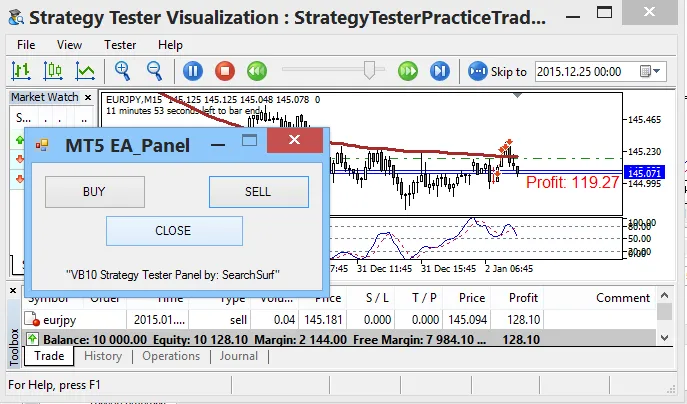
Recommendations:
- If you want to use your favorite indicator for testing, save or rename an indicator template to StrategyTesterPracticeTrade.tpl, matching the EA's name you plan to use in the Strategy Tester.
- Keep an eye on the correct folder location for your command text files (...\MetaQuotes\Terminal\Common\Files\).
- This method can be adapted not just for the Strategy Tester but also to integrate external influences in your other EA codes. For example, instead of just relying on a filename’s presence, you could use
FileOpento read file contents, allowing for dynamic data like Take Profit, Stop Loss, and lot sizes... the possibilities are endless!




Comments 0