
This trading system, MA2CCI, is a refined version of an Expert Advisor originally developed in MQL4 and posted by George-on-Don. You can find the original code here.
How It Works
The strategy relies on the interaction of two Moving Averages (MAs) and the crossing of the zero line by the Commodity Channel Index (CCI). You enter a trade when these indicators signal an opportunity, and you exit when the MAs cross in the opposite direction. The illustration below shows how to enter a sell position, highlighted by a vertical line, with the exit occurring at the reverse crossover of the two MAs.
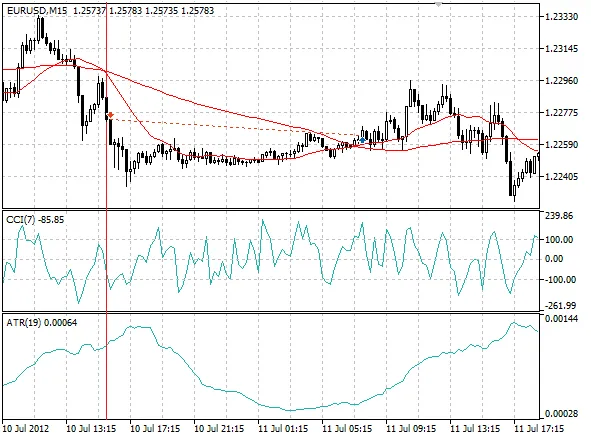
Additionally, the system employs a Stop Loss based on the Average True Range (ATR) indicator. Unlike the original version that used ATR from the current forming bar, this Expert Advisor utilizes ATR from the first completed bar.
When faced with consecutive losses, the system adjusts the volume of new trades, scaling down in proportion to the number of losing positions. Essentially, the more losses you incur, the smaller your lot size becomes. Conversely, if you’re on a winning streak, the Expert Advisor continues to trade at the original lot size. You can set the initial lot size to be either fixed or proportional to your available funds.
Parameters
- FMa: Fast MA period.
- SMa: Slow MA period.
- PCCi: CCI period.
- pATR: ATR period used for Stop Loss.
- Lots: Volume of orders; if set to 0, the MaxR parameter is used.
- SndMl: Sends email notifications when the Expert Advisor opens or closes positions.
- DcF: Factor for reducing lot size during losses. A value of 0 means no reduction occurs. The smaller the value, the more the lot size decreases. If the lot size can't be reduced, the minimum lot will be used.
- MaxR: Maximum risk between 0-1 (share of available funds). This is effective when Lots is set to 0.
Note
This system uses simple MAs based on the closing price, and the CCI is also calculated using the closing price. You can only modify the indicator periods within the properties window.




Comments 0