
Hey there, fellow traders! If you're looking to enhance your trading strategy on MetaTrader 4, you might want to check out this multi-timeframe EA that harnesses the power of the Stochastic Oscillator and Bollinger Bands. Let’s dive into what makes this tool a must-have on your trading desk!
Key Features:
- Multi-Timeframe Analysis: This EA analyzes Stochastic Oscillator and Bollinger Bands values from M1, M5, and M15 charts, providing you with robust trade entry signals.
- Entry Conditions:
- Buy Signal: All three Stochastic K lines need to be below the MinStochOversold level, while the M15 price is hanging below the lower Bollinger Band.
- Sell Signal: Conversely, for a sell, all three Stochastic K lines should be above the MaxStochOverbought level, with the M15 price sitting above the upper Bollinger Band.
- Trade Management:
- It limits the number of trades you can have open at once, adhering to the MaxTradesPerTrend setting.
- Stop Loss (SL) and Take Profit (TP) levels are intelligently calculated using the Average True Range (ATR) from the M15 timeframe, alongside your SLMultiplier and TPMultiplier inputs.
- Spread Control: The EA checks the current spread against MaxSpreadStandard (ideal for standard/ECN accounts) and MaxSpreadCent (for cent/micro accounts). If the spread is too wide, it uses buy limit or sell limit orders instead of jumping in with instant execution.
- Pending Orders: When the market spread is less than ideal for immediate trades, the EA sets pending buy limit or sell limit orders just below the current price for buys and just above for sells.
- Input Flexibility: Customize the EA to fit your trading style with various parameters, including slippage, lot size, indicator settings, SL/TP multipliers, break-even and trailing stop options, maximum spread limits, and Stochastic overbought/oversold levels.
- OnTick Function: The OnTick() function acts as the main engine, retrieving indicator values, checking for open orders, and evaluating conditions to potentially trigger new trades.
- Debugging Tools: This EA includes handy Print() statements for debugging, allowing you to log Stochastic K values across timeframes and monitor the current spread.
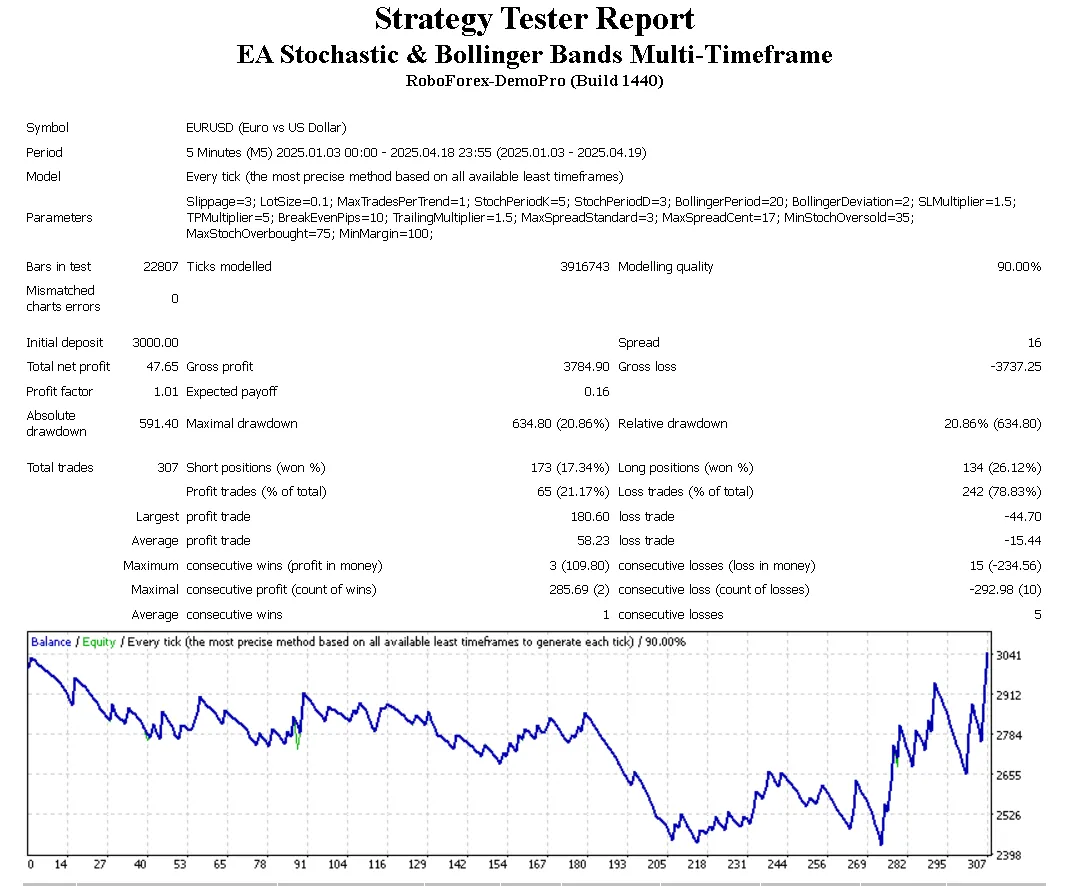
Give this EA a shot and see how it can help refine your trading strategy. Remember, the market is always evolving, so stay adaptable and keep learning!




Comments 0