
If you're looking to step up your trading game, the ColorMETRO_DeMarker indicator could be just what you need. This trading system is designed to generate signals based on the color changes of the cloud when a bar closes, giving you a clear visual cue to make your next move.
Before you get started, make sure you have the compiled indicator file, ColorMETRO_DeMarker.ex5. You can place this file in the terminal_data_directory\MQL5\Indicators folder, so your MetaTrader 5 platform can access it easily.
One of the great things about this Expert Advisor is its compatibility with brokers that offer a nonzero spread. Plus, it gives you the flexibility to set both Stop Loss and Take Profit at the same time when you open a position. If you're interested in exploring more options, check out the Trade Algorithms library for additional resources.
For the tests highlighted below, we used the default input parameters for the Expert Advisor. Notably, in these tests, we did not apply any Stop Loss or Take Profit settings.
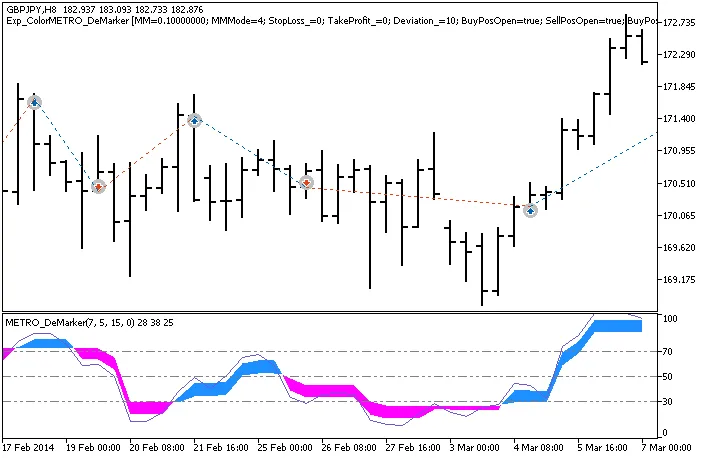
Fig. 1. Trade examples on the chart
Here are the testing results for 2014 using the GBPJPY on an H8 timeframe:
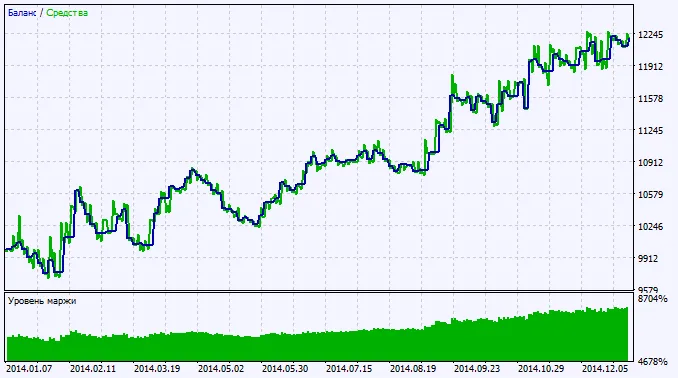
Fig. 2. Chart of testing results




Comments 0