
If you're looking to enhance your trading strategy, check out the FigurelliSeries trend indicator. This trading system operates on a set schedule, making decisions at specific times for opening and closing positions. Let's break down how it works!
Setting Up Your Trading Times
There are two key moments where action happens:
- Position Opening: This is determined by your chosen hour and minute settings.
- Position Closing: Similarly, you'll set the hour and minute for when to close your trades.
Here’s how to set it up in your code:
input Hour StartHour=H08; // Hour to open positioninput Min StartMinute=M00; // Minute to open positioninput HourX StopHour=HX00; // Hour to close positioninput Min StopMinute=M00; // Minute to close position
Direction of Your Trades
When it’s time to open a position, the FigurelliSeries histogram will guide your decision. If the histogram is above zero, it’s time to go short; if it’s below zero, you’ll want to go long. Simple as that!
Getting Started
To use the FigurelliSeries, simply place the FigurelliSeries.ex5 file in your terminal_data_folder\MQL5\Indicators directory.
Keep in mind that the TradeAlgorithms.mqh library is tailored for brokers who provide a nonzero spread and allow you to set both Stop Loss and Take Profit when opening a position. You can find other versions of this library here.
Testing the Waters
For the tests shown below, we used the default input parameters without applying Stop Loss or Take Profit. Here are the results for 2011 on the USDCHF M30:
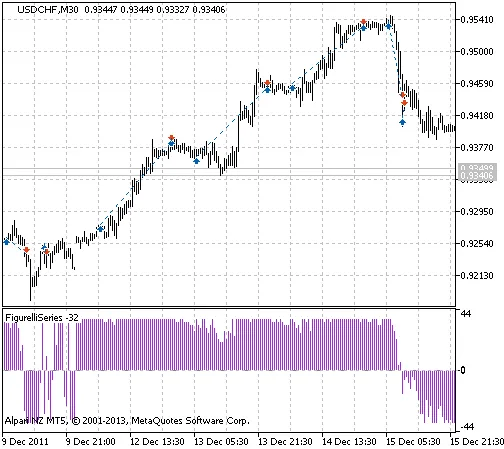
Fig. 1. The instances of history of deals in the chart.
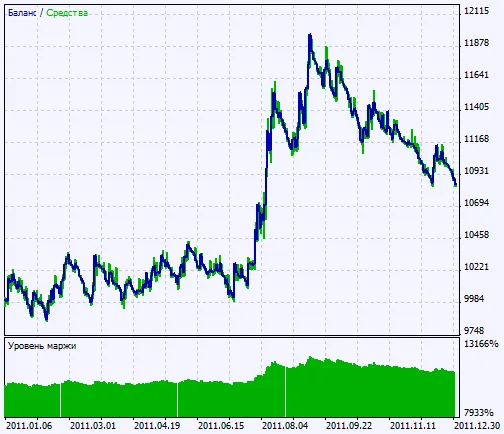
Fig. 2. Chart of testing results




Comments 0