
Are you looking to streamline your trading experience on MetaTrader 5? Look no further than the XP Forex Trade Manager MT5! This handy tool takes the hassle out of managing your open orders by automatically setting your Stop Loss and Take Profit levels as soon as you open a new trade.
As the market moves, the Trade Manager can adjust your Stop Loss to Break Even (where your stop loss equals your open price) or employ a Trailing Stop feature to lock in those profits. This means you can focus more on strategizing rather than micromanaging your trades!
The Forex Trade Manager can manage orders for the current symbols where the EA is active or all open orders across different symbols. Plus, you can keep your Stop Loss and Take Profit levels hidden from brokers, adding an extra layer of strategy to your trading.
Key Features of the Forex Trade Manager MT5:
- Set Stop Loss and Take Profit: Customize your trades by setting SL and TP in pips.
- Trailing Stop Function: This feature trails your SL based on market price movements.
- Break Even Option: Move your SL to Break Even at a specified distance when in profit.
- Stealth Mode: Keep your SL/TP levels hidden from the broker.
Parameter Settings:
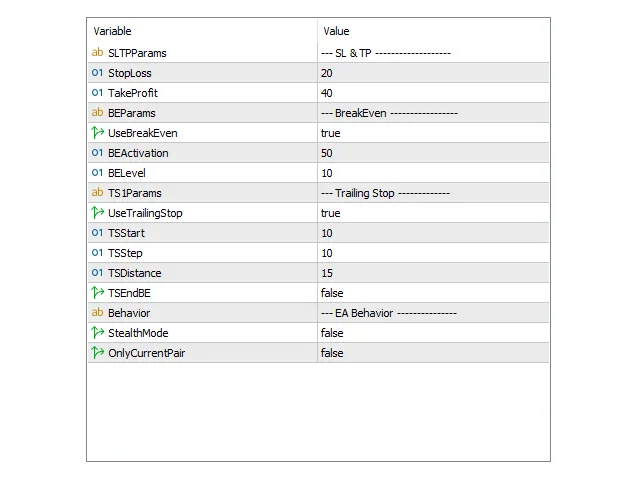
SLTP Params:
- Stop Loss – Set your stop loss in pips for each trade.
- Take Profit – Define your take profit in pips for each trade.
Break Even:
- UseBreakEven (true/false) – Decide if you want to utilize the break-even feature for open trades.
- BEActivation – Set the profit in pips needed to activate the break-even function.
- BELevel – Determine the extra distance from BE in pips for placing SL using the break-even function.
Trailing Stop:
- UseTrailingStop (true/false) – Choose to enable the trailing stop function for your open trades.
- TSStart – Define the profit in pips to activate trailing stop.
- TSStep – Set the minimum difference in pips between new and current SL for the trailing stop to move.
- TSDistance – Distance from the current price in pips for SL placement by the trailing stop.
Behavior:
- StealthMode (true/false) – Hide SL/TP levels from the broker while the EA manages trades.
- OnlyCurrentPair (true/false) – Control whether to manage trades only from the current chart’s symbol or all pairs.
Additional Information:
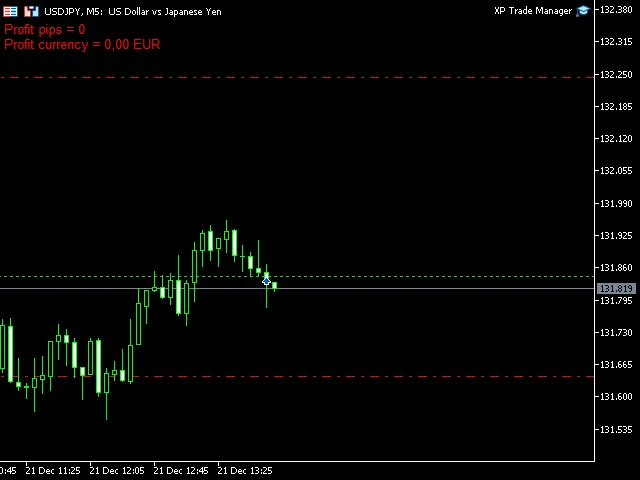
All parameters for trades and functions can be adjusted in the EA settings. The Forex Trade Manager also displays real-time info on your daily profit/loss in pips and your account currency right on your chart, making it easier to track your performance.




Comments 0