
Description:
The Control Panel is your go-to tool for manual trading and intraday scalping. Designed specifically for scalpers, it streamlines your trading experience.
Here’s what it looks like:
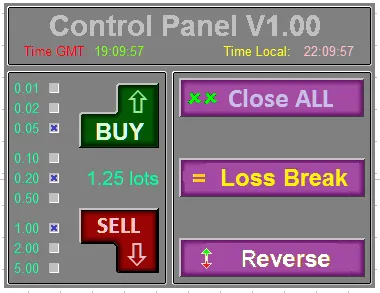
Figure 1. Control Panel
Top Panel Overview:
- Title and version;
- GMT time;
- Local time;
Left Panel Features:
- Trade Volume: This field sums the values selected in the trade panel, allowing you to set your trade volume quickly and accurately. You can define up to 9 values in the input parameters of your system trading setup.
- Buy/Sell Buttons: These buttons let you open long or short positions. The volume for your position is displayed right below the Buy button, making it easy to keep track.
Right Panel Functions:
- Close ALL: This option allows you to close all opened positions at the current market price.
- Loss Break: Sets a Stop Loss at the Even Break level defined in your input parameters.
- Reverse: This function reverses your currently open position, giving you flexibility in your trading strategy.




Comments 0