
Hey there, fellow traders! If you're looking to enhance your trading skills and get a feel for the market, I've got something special for you – the TrainYourself EA. This nifty tool is perfect for simulating trades in the strategy tester of MetaTrader 4 using a simple drag-and-drop interface.
To get started, you'll see four objects that you can easily drag into the yellow basket. Just double-click on any object to select it, then drag it onto the yellow box to take action. It's as straightforward as it sounds!
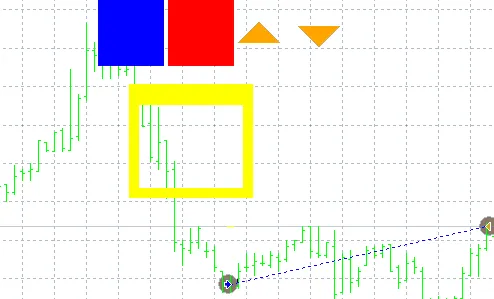
Here's a quick rundown of what each object does:
- Up Arrow: This represents a buy signal.
- Down Arrow: This indicates a sell signal.
- Red Box: This stops all active orders.
- Blue Box: This creates trend lines that you can also drag and drop.
- Don't forget to double-click objects to select them.
- Once selected, drag and drop them into the yellow box to execute your strategy.
- Adjust your stop loss and take profit levels to match your trading style.
With the trend lines in place, the EA will automatically open an order if the price crosses above or below the line. It’s a great way to practice and refine your strategies without any risk!
Good luck out there, and happy trading!




Comments 0