
Author of the Idea: Scriptor, MQL5 Code Creator: barabashkakvn.
When it comes to trading channels, using the right settings is crucial. This Expert Advisor (EA) is designed to function optimally on the H1 timeframe, specifically for the EUR/USD pair. You can also customize its operation hours through the From hour and To hour parameters.
The EA operates within a channel defined by a combination of indicators—specifically, one Moving Average and three Envelopes, each with varying heights. It employs two short-term Moving Averages set to a period of 2, one based on Close prices and the other on Open prices.
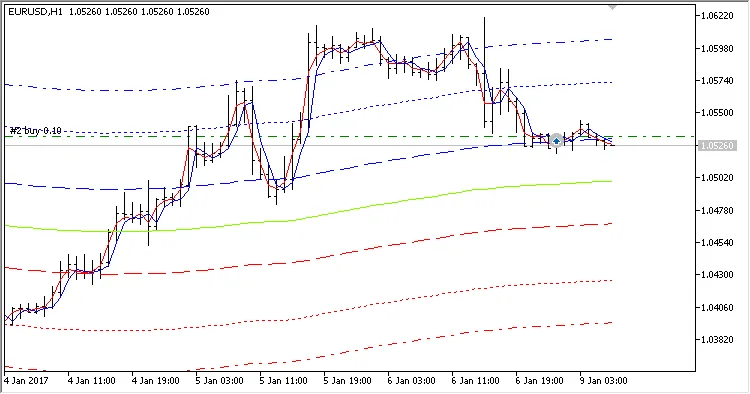
The EA features separate settings for stop loss, take profit, and trailing stops for both BUY and SELL positions, giving you greater control over your trades.
Input Parameters
- Lots - Defines the volume of the position to open;
- Stop Loss BUY (in pips) - Sets the stop loss for BUY trades;
- Stop Loss SELL (in pips) - Sets the stop loss for SELL trades;
- Take Profit BUY (in pips) - Sets the take profit for BUY trades;
- Take Profit SELL (in pips) - Sets the take profit for SELL trades;
- Trailing Stop BUY (in pips) - Sets the trailing stop for BUY trades;
- Trailing Stop SELL (in pips) - Sets the trailing stop for SELL trades;
- Use trade hours - Option to enable specific trading hours;
- From hour - Designates the start of trading hours;
- To hour - Designates the end of trading hours;
- Magic number - A unique identifier for the EA.
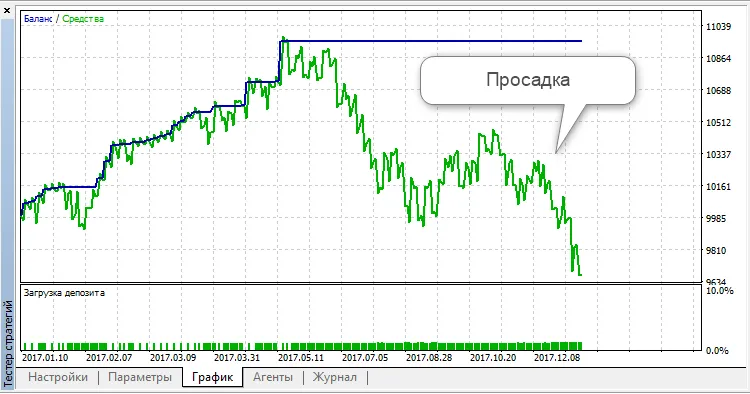
Keep in mind that trading without a stop loss can expose you to significant drawdown risks, as illustrated below:




Comments 0