
Hey fellow traders! Today, I want to introduce you to the GO Expert Advisor, reworked from MQL4 by the talented ExpertTrader. You can dive into the original code here.
How Does It Work?
GO operates using a specific formula:
GO = ((C-O) + (H-O) + (L-O) + (C-L) + (C-H)) * V;
In this formula, C, O, H, and L represent the Moving Average values based on Close, Open, High, and Low prices, while V stands for the signal bar volume.
If the GO value is greater than 0, it triggers a buy order. Conversely, if the value dips below 0, it closes the buy order and opens a sell order instead.
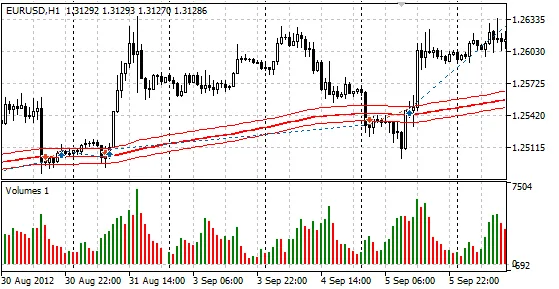
Take a look at the image below, showcasing the performance of the GO Expert Advisor in the strategy tester's visual mode:
Parameters You Need to Know
- Lots: This sets the lot size. If it's set to 0, the MaxrR parameter kicks in.
- MaximumRisk: This controls your risk level (default is Lots=0).
- Shift: This parameter determines which bar's indicators are checked: 0 for the forming bar, and 1 for the first formed bar.
- MAPeriod: This is the period for your Moving Average.
- MAShift: This indicates the shift for the Moving Average.
- MAMethod: This defines the method used for the Moving Average.
- VolVolume: This sets the volume.
- OpenLevel: When GO exceeds this level, a buy order is activated; if it drops below -OpenLevel, a sell order opens.
- CloseLevelDif: This is the difference between the opening and closing level, and it should be a positive value. The closing level must be equal to or less than the opening level.
- ShowGO: This option displays the GO value on your chart comments.
A Quick Note
If the OpenLevel is set to 0, the bar volume won’t have any influence, so keep in mind that the OpenLevel and CloseLevelDif parameters are included for flexibility. These parameters weren't included in the original version, but we’ve added external parameters for the Moving Average for your convenience.
Happy trading, and may your profits soar!




Comments 0