
Idea by: Gatis.
MQL5 code by: Vladimir Karputov.
Today, we’re diving into an Expert Advisor (EA) that leverages the power of two popular indicators: the MACD and the SAR. This EA analyzes four key parameters:
- Value of the main line of MACD on bar #1 (macd_main_1)
- Value of the signal line of MACD on bar #1 (macd_signal_1)
- Value of the SAR on bar #1 (sar_1) in relation to the current Bid price (m_symbol.Bid())
These parameters come together to form the basic signals for Buy and Sell:
bool open_buy        = (macd_main_1>macd_signal_1 && macd_signal_1<0 && sar_1<m_symbol.Bid());
   bool open_sell       = (macd_main_1<macd_signal_1 && macd_signal_1>0 && sar_1>m_symbol.Bid());
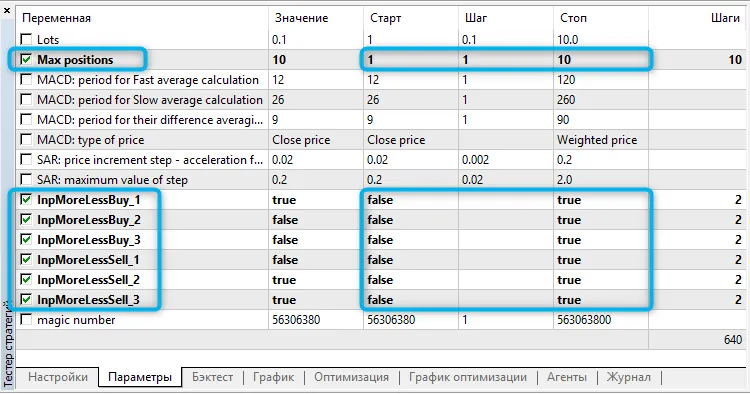
Feel free to tweak the comparison values < and > in the formula. To do this, we introduce specific variables for each comparison sign: InpMoreLessBuy_1, InpMoreLessBuy_2, InpMoreLessBuy_3, InpMoreLessSell_1, InpMoreLessSell_2, and InpMoreLessSell_3. This way, you can customize the basic formula like so:
bool open_buy=    (InpMoreLessBuy_1   ? macd_main_1>macd_signal_1      : macd_main_1<macd_signal_1) &&
                  (!InpMoreLessBuy_2  ? macd_signal_1 < 0              : macd_signal_1 > 0 ) &&
                  (!InpMoreLessBuy_3  ? sar_1         < m_symbol.Bid() : sar_1         > m_symbol.Bid() );
   bool open_sell=(!InpMoreLessSell_1 ? macd_main_1<macd_signal_1      : macd_main_1>macd_signal_1) &&
                  (InpMoreLessSell_2  ? macd_signal_1 > 0              : macd_signal_1 < 0 ) &&
                  (InpMoreLessSell_3  ? sar_1         > m_symbol.Bid() : sar_1         < m_symbol.Bid() );
This EA only springs into action when a new bar appears, and it will close positions that are contrary to the received signal.
As you optimize your formula, it’s also wise to consider optimizing the number of positions being traded:




Comments 0