
If you’re looking to enhance your trading game, the MAVA-XonaX Expert Advisor is worth a closer look. This system trading tool utilizes moving averages that are based on both the opening and closing prices, making it a solid choice for traders.
To set it up, simply attach four moving average (MA) indicators, each with a period of 6, to your H4 EUR/USD chart. Here’s how it breaks down:
- MA open: Based on opening prices
- MA close: Based on closing prices
- MA high: Based on high prices
- MA low: Based on low prices
The first two are your signal indicators. When the market is heading south, you’ll notice that the opening price of the candlesticks is higher than the closing price. This indicates that the moving average based on the opening prices will be higher. So, here’s the deal: if MA close crosses MA open from below, it’s time to buy. Conversely, if MA open rises above MA close, that’s your cue to sell.
To maximize the effectiveness of the MA indicators, set your take profit at the average spread for the given period, which you can calculate using the formula: MA high – MA low. For your stop loss, if you’re selling, it should be set at 2 * (MA high – MA open). For buying, it’s 2 * (MA close – MA low).
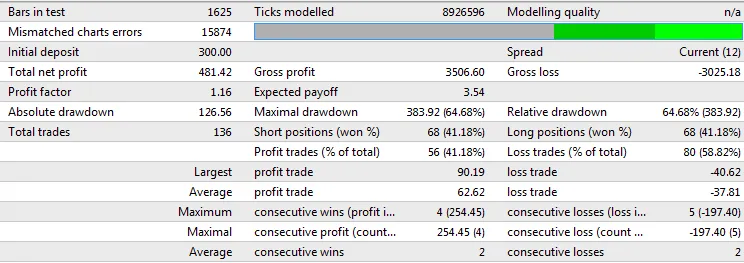
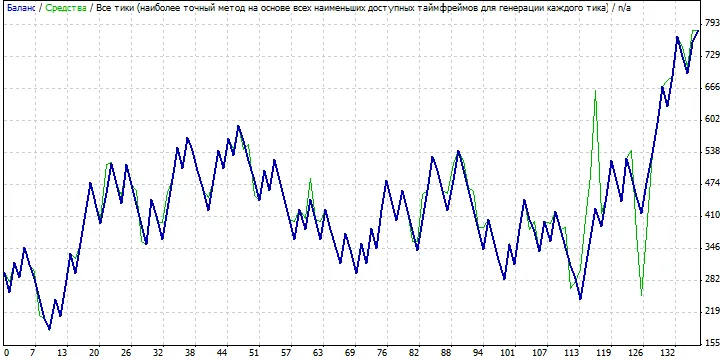
This Expert Advisor has been tested over the period from February 20, 2015, to July 16, 2015, and the results are promising.
Testing Results:




Comments 0