
Unlocking the Power of Multi-Time Frame Trading
If you're looking to enhance your trading strategy, the Multi Time Frame Trader EA for MetaTrader 4 is a game changer. This EA analyzes three different time frames to determine the best moments to enter trades, whether you're looking to go long or short. It uses the !LinRegrBuf indicator to assess the trend and slope across the M1, M5, and H1 time frames.
How It Works
- Long Trades: If the H1 trend is upward (+), the EA waits for the M5 and M1 time frames to signal oversold conditions. It will enter a long trade once both time frames show signs of overselling, determined by their respective iLow values being lower than the supports indicated by the !LinRegrBuf. The take profit is set at the center line of the !LinRegrBuf on the M5 chart, with a stop loss at half of that value.
- Short Trades: Conversely, if the H1 trend is downward (-), the EA looks for overbought conditions in the M5 and M1 frames. It enters a short position when both frames indicate overbought states, verified by their iHigh values being higher than the resistances from the !LinRegrBuf. Again, the take profit is at the center line of the !LinRegrBuf on the M5 chart, and the stop loss is half of that.
- Risk/Reward Ratio: This EA maintains a solid risk/reward ratio of 1:2 on all trades.
- Versatile Application: The EA is adaptable and can be used on any trading symbol, making it a flexible addition to your trading toolkit.
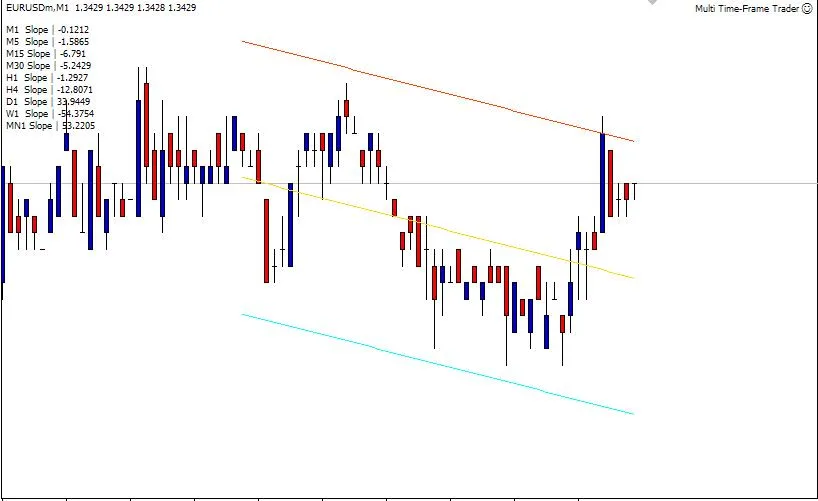
Trend Analysis Made Easy
- This EA is compatible with any chart and time frame, providing a quick glance at the slope of trends across multiple frames, as illustrated in the top left corner of the image above. For instance, an M1 slope reading of -0.1212 indicates a negative trend, clearly visible with the help of the !LinRegrBuf indicator.
EA Properties
- Trade: Enables trading based on analyzed trends and slopes.
- BarstoCount: This value is used with the !LinRegrBuf indicator to define the trend. For more details, check this link: !LinRegrBuf Indicator.
- Lots: Specify the lot size for your orders.
- Slippage: Set the acceptable slippage for your orders.
- Magic Number: A unique identifier for tracking orders opened by this EA.
Need More Info?
- To get started, download the !LinRegrBuf.mq4 file to the MT4 indicator directory (experts\indicators).
- For an in-depth look at this strategy, visit: Saxo Education Multi-Time Frame Trading.
- Learn more on multi-time frame trading from Investopedia: Investopedia Article.
Happy trading!




Comments 0