
Description:
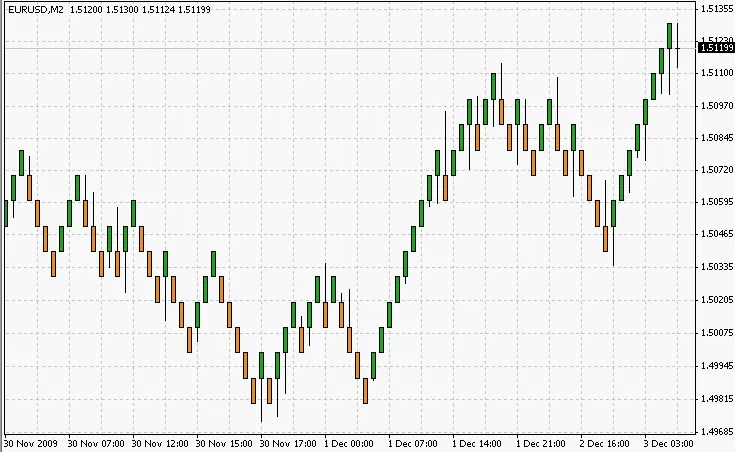
Renko charts are built by comparing the current period's closing price with the high and low prices of the previous "brick" (either white for bullish or black for bearish).
If the current closing price exceeds the previous "brick"'s high by at least the size of one "brick", a new column is added, creating one or more white "bricks". Conversely, if the price drops below the previous "brick"'s low by at least the size of one "brick", one or more black "bricks" appear on the chart.
In cases where the price moves past the minimum or maximum of the previous "brick" by more than one "brick" but doesn't form a new "brick", only one "brick" will be drawn.
Originally developed to identify primary trends, Renko charts can produce false signals, particularly during flat or short trends. However, they are effective for capturing the main movements of larger trends.
These charts are always based on closing prices for the designated period. Consequently, creating them from other chart types with varying timeframes can yield different results. Using a larger scale for Renko Charts can amplify its primary disadvantage; therefore, utilizing tick or minute data is generally recommended.
You can apply traditional technical analysis methods to Renko Charts, but keep in mind: the minimum and maximum values of a white "brick" match the open and close prices, respectively. Conversely, the minimum and maximum values of a black "brick" align with the close and open prices. This discrepancy can lead to inaccurate results if you use technical indicators that compare open, close, high, and low prices within a single "brick".
It's also important to note that Renko charts do not account for volume, so volume indicators will not function properly.
Installation:
To get started, copy RenkoLiveChart_v3.2.mq4 to C:\Program Files\MT4\experts.
Next, run the terminal and make sure to enable experts and allow DLL use:
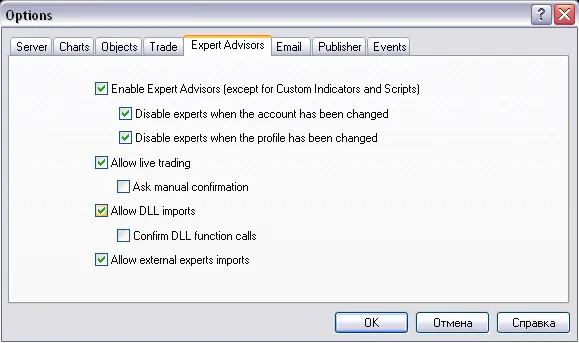
Now, attach the expert advisor to your chosen chart.
Enable expert advisors:
Wait for a new tick...
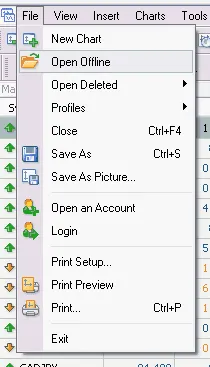
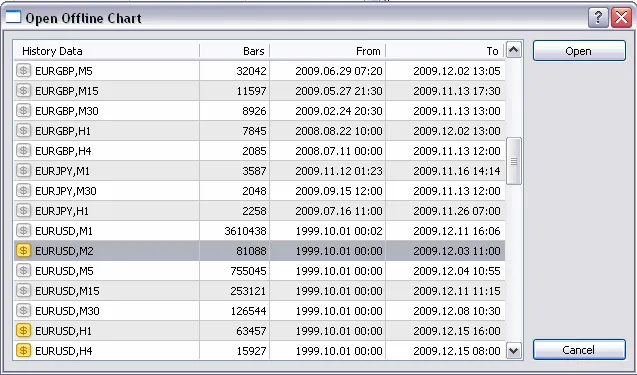
Editor's Note:
Keep in mind that this is a mirror translation of the original Russian version.
If you have questions for the author, suggestions, or comments, it's best to post them here.
If you found this code helpful for your trading or educational purposes, don't forget to express your gratitude to the author!




Comments 0