
If you're diving into the world of trading with MetaTrader 5, you might want to check out the BlauErgodic oscillator. It's a handy tool that can help you identify potential trade opportunities.
So, how does it work? A trade signal is generated when the histogram shifts direction, crosses the zero line, or when the signal line cloud changes color. Keeping an eye on these indicators can give you an edge in your trading strategy.
For those interested in customizing their approach, there's an input parameter you can tweak for your entry algorithm:
input AlgMode Mode=twist; // Algorithm for market entering
To ensure your EA runs smoothly, make sure to place the compiled indicator file BlauErgodic.ex5 in the terminal_data_folder\MQL5\Indicators. This step is crucial for the setup.
Also, keep in mind that the TradeAlgorithms.mqh library allows you to use Expert Advisors even with brokers that have a non-zero spread. Plus, it gives you the flexibility to set your Stop Loss and Take Profit at the same time as opening a position. If you're looking for more options, check out other versions of this library like TradeAlgorithms.
The testing phase for this Expert Advisor used the default input parameters, and interestingly, neither Stop Loss nor Take Profit was applied during the tests. Here’s a look at the results from 2012-2013 on the EURUSD H4 chart:
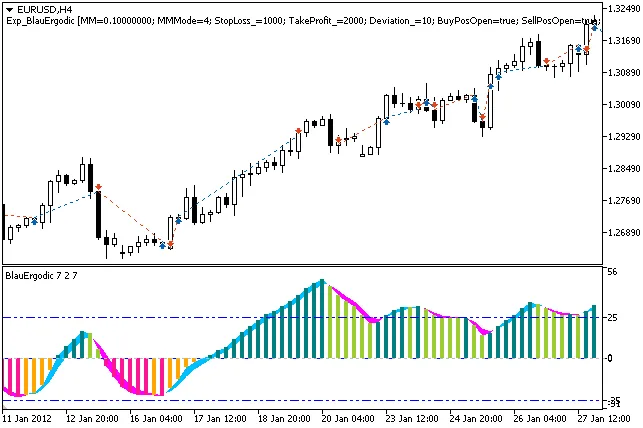
Fig. 1 The instances of history of deals on the chart
And here’s the chart showing the testing results:
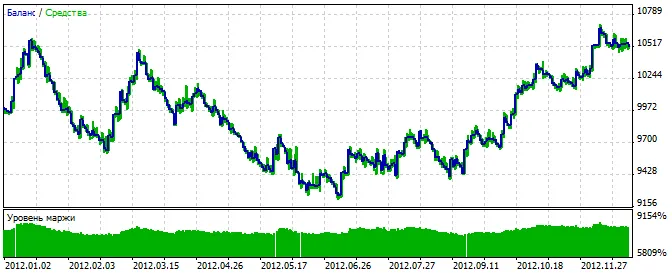
Fig. 2. Chart of testing results




Comments 0