
Are you looking to enhance your trading strategy? Let’s dive into the ColorXTRIX_Histogram Expert Advisor (EA) designed for MetaTrader 5. This system generates trading signals based on the histogram's direction change when a bar closes.
To get started, you'll need to have the compiled indicator file, ColorXTRIX_Histogram.ex5, saved in your <terminal_data_folder>\MQL5\Indicators directory. This is crucial for the EA to function correctly.
One of the great features of this EA is its compatibility with brokers offering a non-zero spread. Plus, you have the flexibility to set both Stop Loss and Take Profit right when you open a position. If you're interested in exploring more options, you can download various versions of the Trade Algorithms library.
During the testing phase, we used the default input parameters for the EA. Notably, our tests did not incorporate Stop Loss or Take Profit settings.
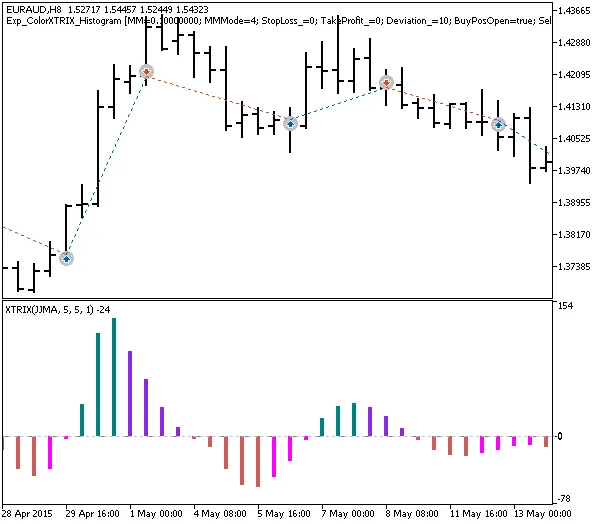
Fig. 1. Examples of trades on the chart
Now, let’s take a look at the testing results from 2015 using the EURAUD H8 pair:
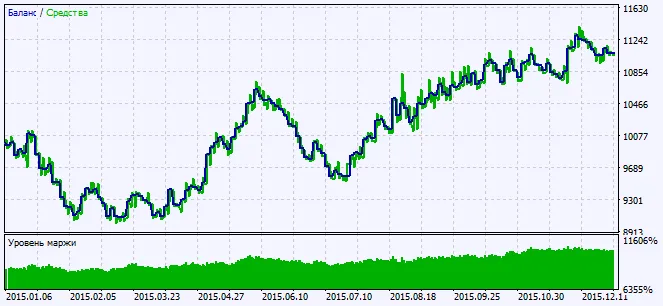
Fig. 2. Charts of testing results




Comments 0