
Author of the Idea:Scriptor
MQL5 Code Author:barabashkakvn
This Expert Advisor (EA) kicks into gear whenever a new bar forms. The position volume is fixed and managed via the Lots parameter. You can also toggle Stop Loss, Take Profit, and Trailing Stop by setting their values to "0.0" if you prefer not to use them. Pay particular attention to the Trailing Step setting, which controls the trailing step distance.
At the heart of this EA are two Moving Averages, referred to as the First and Second. The crossing method is straightforward (not the most precise, but definitely easy to understand) by examining the values of the indicators on two consecutive bars:
//--- Buy Signal
   if(MA_First[1] > MA_Second[1] + ExtMA_MinimumDistance && MA_First[2] 2] - ExtMA_MinimumDistance)
...
//--- Sell Signal
   if(MA_First[1] 1] - ExtMA_MinimumDistance && MA_First[2] > MA_Second[2] + ExtMA_MinimumDistance)
...
Here's what those terms mean:
- MA_First[1] - Value of the First indicator on bar #1;
- MA_First[2] - Value of the First indicator on bar #2;
- MA_Second[1] - Value of the Second indicator on bar #1;
- MA_Second[2] - Value of the Second indicator on bar #2;
- ExtMA_MinimumDistance - This is the calculated parameter that determines the minimum distance between the two indicators (Minimum Distance Between MAs). You can disable this feature completely by setting it to "0.0" in the inputs.
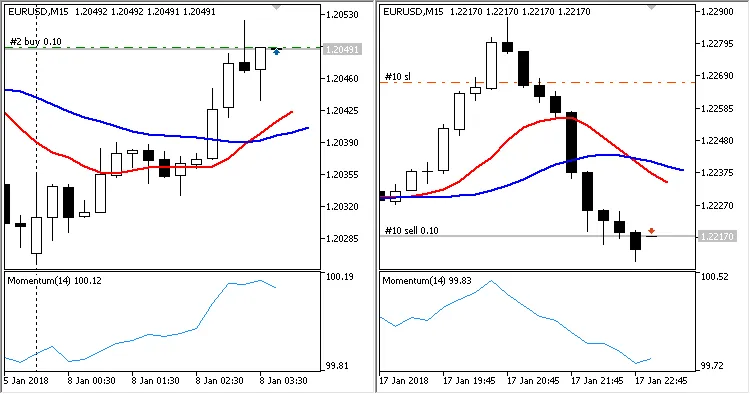
Each signal generated is then filtered through the Momentum indicator, which checks if the Momentum filter parameter is active.
Visually, this process can be illustrated as follows:
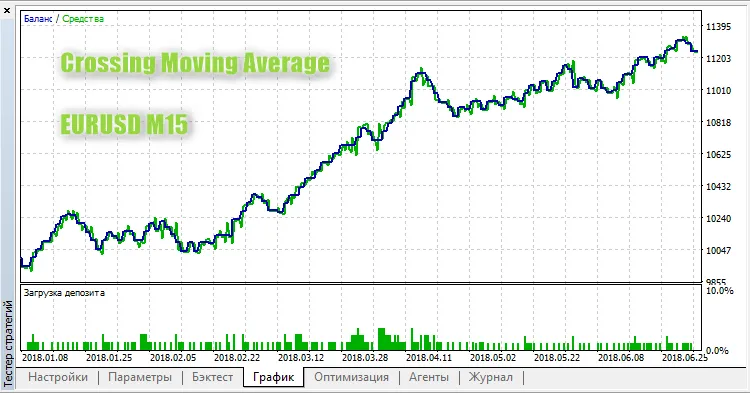
Here’s a test run on EURUSD M15:




Comments 0