
Author: Vladimir Khlystov
If you're looking for a straightforward Expert Advisor (EA) that leverages the power of the Fractal Weight Oscillator, you've come to the right place! This EA is designed to sell when the oscillator crosses below the overbought level and buy when it crosses above the oversold level. The signals are generated at the close of the bar, ensuring you make well-timed decisions.
The Fractal_WeightOscillator_HTF indicator included in the EA is primarily for clearer trend visualization during backtesting. It won't affect the EA's performance in live trading.
To get started, place the compiled files Fractal_WeightOscillator.ex5 and Fractal_WeightOscillator_HTF.ex5 in your <terminal_data_folder>\MQL5\Indicators directory.
Once compiled, the Exp_Fractal_WeightOscillator.ex5 file includes the Fractal_WeightOscillator and Fractal_WeightOscillator_HTF indicators as resources. This means you don't need to have these indicators in the terminal folder for the EA to function correctly! We've added the necessary code to the EA to incorporate these indicators directly.
The indicator files are included as resources at the global scope:
#resource "\Indicators\Fractal_WeightOscillator.ex5"
#resource "\Indicators\Fractal_WeightOscillator_HTF.ex5"
In the OnInit() function, the string paths to these indicators have been modified:
InpInd_Handle=iCustom(Symbol(),InpInd_Timeframe,"::Indicators\Fractal_WeightOscillator",
e_period,normal_speed,RSIWeight,RSIPrice,MFIWeight,MFIPrice,MFIVolumeType,
WPRWeight,DeMarkerWeight,bMA_Method,bLength,bPhase,HighLevel,LowLevel);
if(InpInd_Handle==INVALID_HANDLE)
{
Print(" Failed to get handle of the Fractal_WeightOscillator indicator");
return(INIT_FAILED);
}
//---- Getting the handle of the Fractal_WeightOscillator_HTF indicator for visualization in the strategy tester
if(MQLInfoInteger(MQL_VISUAL_MODE))
{
//---- getting the handle of the Fractal_WeightOscillator_HTF indicator
int Ind_Handle=iCustom(Symbol(),Period(),"::Indicators\Fractal_WeightOscillator_HTF",InpInd_Timeframe,
e_period,normal_speed,RSIWeight,RSIPrice,MFIWeight,MFIPrice,MFIVolumeType,
WPRWeight,DeMarkerWeight,bMA_Method,bLength,bPhase,HighLevel,LowLevel);
if(Ind_Handle==INVALID_HANDLE)
{
Print(" Failed to get the handle of the Fractal_WeightOscillator_HTF indicator");
return(INIT_FAILED);
}
}
This means the compiled EA can be used independently on different trading terminals without needing the indicators present.
Keep in mind that the TradeAlgorithms.mqh library enables Expert Advisors to function with brokers that offer nonzero spreads and allows setting Stop Loss and Take Profit simultaneously when opening a position. You can check out more options for the library here: Trade Algorithms.
For the tests shown below, we used the default input parameters for the Expert Advisor. Notably, Stop Loss and Take Profit were not utilized during these tests.
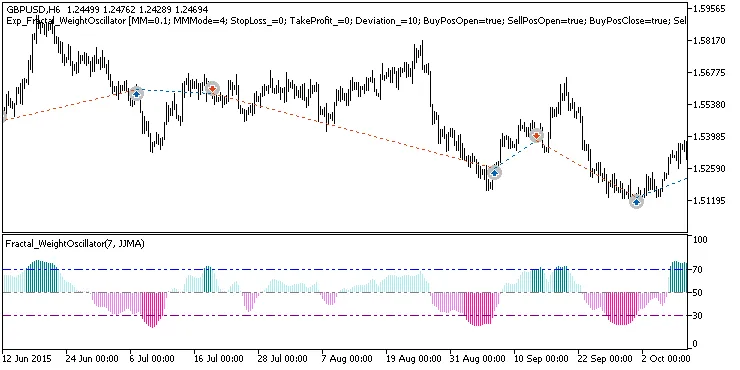
Fig. 1. Examples of deals on the chart
Here are the testing results for 2015 on the GBPUSD H6:
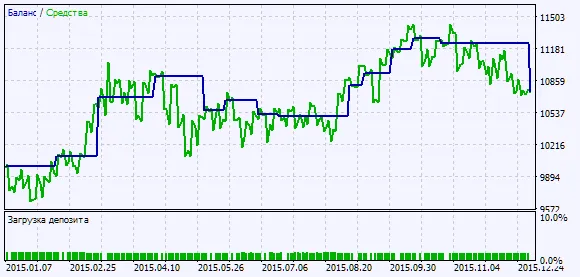
Fig. 2. Chart of testing results




Comments 0