
Hey there, fellow traders! Today, we're diving into the Exp_Stopreversal_Tm Expert Advisor, a nifty tool for MetaTrader 5 that leverages signals from the Stopreversal indicator. One of its standout features is the ability to set a strict trading time interval, making it easier for you to focus your trading efforts.
Here’s how it works: a trading signal is generated at the close of a bar when a colored indicator arrow appears. This makes for a pretty straightforward decision-making process.
Setting Your Trading Time
You can specify your trading hours in the input parameters to trade within your desired time frame. Here’s a quick look at how you can set it up:
inputbool TimeTrade=true; //Enable trading during specified hoursinput HOURS StartH=ENUM_HOUR_0; //Trading starts at this hourinput MINUTS StartM=ENUM_MINUT_0; //Trading starts at this minuteinput HOURS EndH=ENUM_HOUR_23; //Trading ends at this hourinput MINUTS EndM=ENUM_MINUT_59; //Trading ends at this minute
With two variables for start time (hours and minutes) and another two for end time, you’ve got plenty of flexibility. By default, the EA will trade from midnight (0:00) and close all positions by 23:59.
And here’s a little tip: if your start time is later than your end time, the EA will automatically close any open positions the following day at your specified time.
Getting Started
To ensure everything runs smoothly, make sure to add the Stopreversal.ex5 compiled indicator file to your <terminal_data_folder>\MQL5\Indicators directory.
The default input parameters were used during the tests shown below, and remember, we didn’t utilize Stop Loss or Take Profit during those tests.
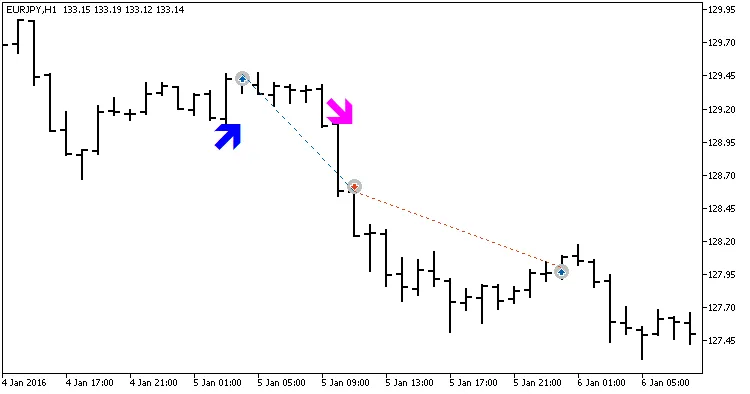
Fig.1. Examples of deals on the chart.
Testing Results
Here are the testing results for 2016 on the USDJPY H1 timeframe:
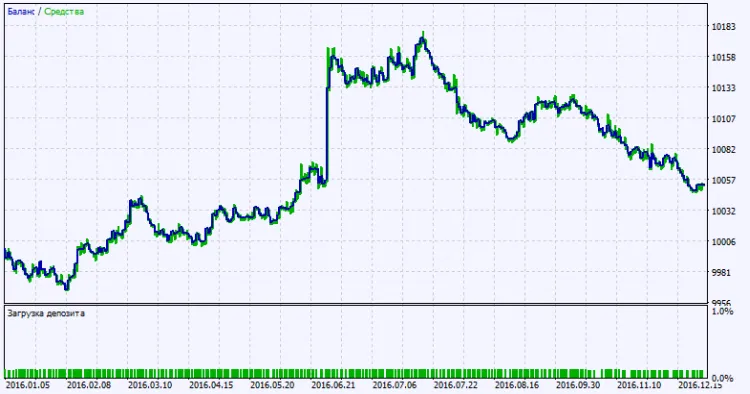
Fig. 2. Testing results chart.




Comments 0