
If you're looking to enhance your trading strategy, the T3_TRIX indicator could be your new best friend. This trading system is designed to assist you in making informed decisions based on histogram movements and signal line cloud changes.
Here's the lowdown: a trade decision is triggered when the histogram shifts direction, breaks through the zero line, or when the color of the signal line cloud changes. It's all about timing your entries for maximum impact!
Entry Algorithm Selection
To customize your entry strategy, you’ll want to focus on the following input parameter:
input AlgMode Mode=twist; // Algorithm for market entry
For the EA to work its magic, make sure to place the compiled indicator file T3_TRIX.ex5 in your terminal_data_folder/MQL5/Indicators. This setup is crucial for the smooth operation of your EA.
Another key point: the TradeAlgorithms.mqh library is a game changer. It allows you to use Expert Advisors with brokers that offer nonzero spreads and lets you set Stop Loss and Take Profit right alongside your position openings. You can explore more variants of this library here: TradeAlgorithms.
Testing Insights
In the tests conducted, we used the default input parameters for the Expert Advisor, and it's worth noting that Stop Loss and Take Profit were not utilized during these tests.
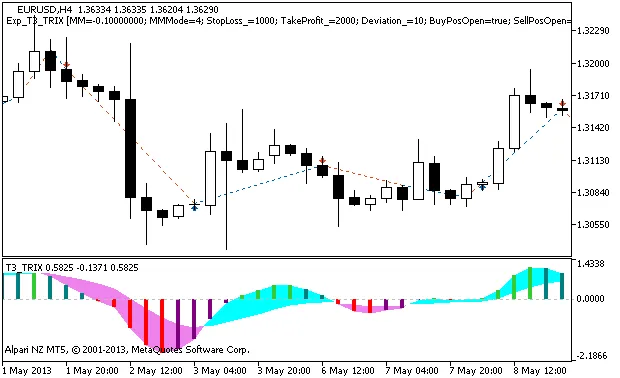
Fig. 1 The instances of history of deals on the chart.
Here are the testing results for 2013 on the EURUSD H4:
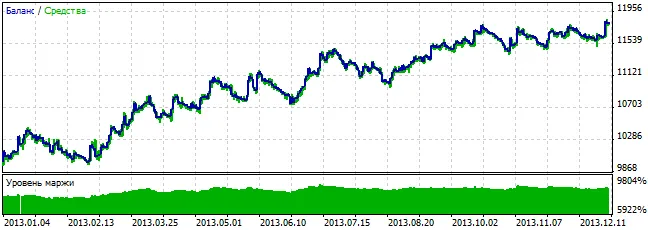
Fig. 2. Chart of testing results




Comments 0