
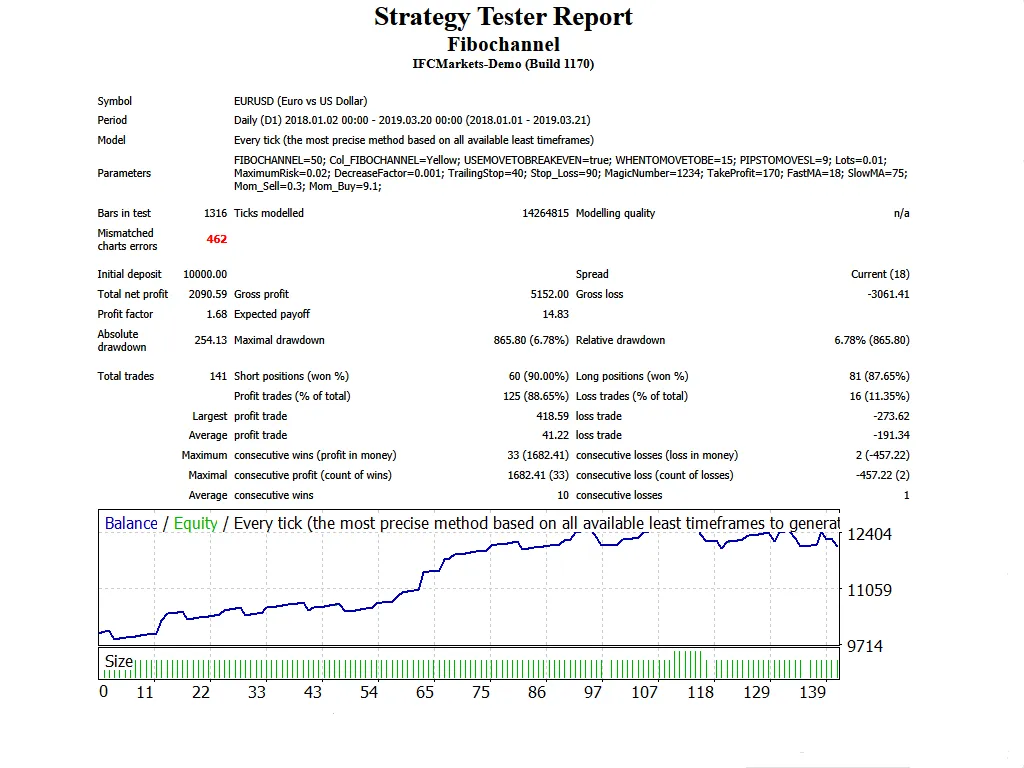
Welcome to the world of trading! Today, let’s dive into the Fibochannel Line EA, a powerful tool designed for MetaTrader 4 that helps you harness the Fibonacci channels for effective trading. This EA not only visualizes Fibonacci channel lines on your charts but also trades based on prevailing market trends. Plus, it features a Trailing Stop Loss and Take Profit, making it adaptable for all time frames, including major forex pairs and stocks like those on NASDAQ.
Quick Tip: It shines particularly well on the 1-hour time frame!
Here are some key points to keep in mind:
- Demo First: Always test it on a demo account before going live.
- Open Candle Trading: This EA only trades based on the price of the opening candle!
- Lot Size Control: If you prefer not to increase your lot size after a losing trade, set
IncreaseFactor=0. - Combination Strategy: This EA combines the effectiveness of two moving averages with Fibonacci channel lines.
- Testing Limitations: The Fibonacci channel lines won’t work in test mode; they function in live trading only.
- Visual Aid: During tests, the EA will only display Fibonacci channel lines in visual mode without executing trades based on them.
- Trade Filtering: The Fibonacci channel lines will act as a filter, increasing your chances of winning trades.
Now, let’s check out the inputs you can tweak:
- Use_TP_In_Money: Enable Take Profit in money (true/false).
- TP_In_Money: Set Take Profit in money (choose between 10-100).
- Use_TP_In_percent: Enable Take Profit in percent (true/false).
- TP_In_Percent: Set Take Profit in percent (choose between 10-100).
- Enable_Trailing: Activate trailing stop (true/false).
- Take Profit In Money: (values: 25-300).
- Stop Loss In Money: (values: 1-20).
- Fibochannel Line Length: Adjust the length (10-100 bars).
- Fibochannel Line Color: Customize your channel line color.
- tick: Set to false for every tick or true for open prices.
- Exit: Close trades if the trend goes against you (true/false).
- Lots: Define lot size (values: 0.01-10).
- Stop_Loss: Set a stop loss (values: 10-100).
- MagicNumber: Assign a magic number (values: 1-100000).
- FastMA: Specify Fast Moving Average (1-20).
- SlowMA: Specify Slow Moving Average (50-200).
Remember: Regularly optimize this EA every few months and stick to the same inputs. You can use it as a hedging grid EA or for single trades. For backtesting guidance, check out this link: How to Perform Backtest.




Comments 0