
Idea by: Scriptor.
MQL5 Code by: Vladimir Karputov.
Introducing the MACD Stochastic 2, an Expert Advisor (EA) designed specifically for MetaTrader 5. This EA utilizes two powerful oscillators: the iMACD, which operates on an adjustable timeframe, and the iStochastic that functions on the current chart timeframe. The key principle is to ensure that the MACD timeframe is set higher than the timeframe displayed on your chart.
Each trade can be finely tuned with individual stop loss and take profit settings for both BUY and SELL positions. Plus, the trailing stop is uniform across all trade types, giving you a streamlined approach to managing your positions.
Input Parameters
- Lots - This defines the volume of your position (set manually).
- Stop Loss BUY (in pips) - Your designated stop loss for BUY trades.
- Stop Loss SELL (in pips) - Your stop loss for SELL trades.
- Take Profit BUY (in pips) - The take profit level for BUY positions.
- Take Profit SELL (in pips) - The take profit level for SELL positions.
- Trailing Stop BUY and SELL (in pips) - A single trailing stop for both BUY and SELL trades.
- Trailing Step BUY and SELL (in pips) - The interval for the trailing stop movement.
//--- Indicator Inputs:
- MACD: Period - The overall period for the MACD indicator.
- MACD: Fast Average Period - Period for the calculation of the fast average.
- MACD: Slow Average Period - Period for the calculation of the slow average.
- MACD: Difference Averaging Period - Period for averaging the difference.
- MACD: Price Type or Handle - Select the type of price to use.
- Stochastic: K-Period - Number of bars used for calculation.
- Stochastic: D-Period - The first smoothing period for the stochastic indicator.
- Stochastic: Final Smoothing - The final smoothing setting.
- Stochastic: Type of Smoothing - Choose the smoothing method.
- Stochastic: Calculation Method - Method used for stochastic calculation.
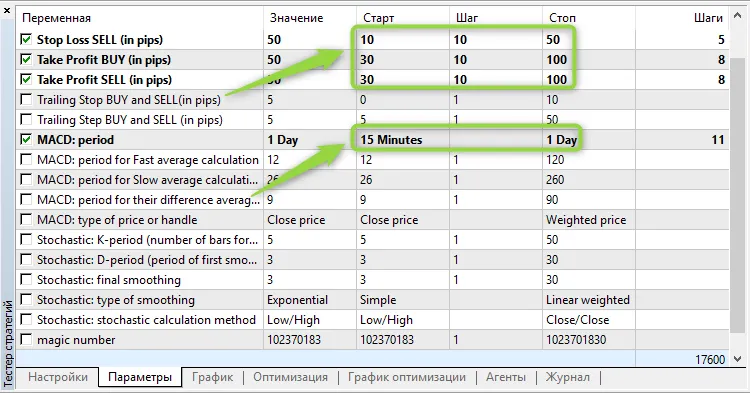
It’s crucial to optimize these inputs for each trading symbol and timeframe to get the best results. For example, an optimization range for AUDUSD on the M15 chart is recommended:




Comments 0