
Welcome, fellow traders! Today, we're diving into the MACD pattern known as 'Trend Continuation'. This strategy is designed to help you make the most out of your trades using Expert Advisors (EAs) on MetaTrader 4.
The EA was crafted to test the effectiveness of the trading strategy discussed in our latest magazine issue. You can grab your copy and check out the results along with the EA parameters by visiting our website: http://www.fortrader.ru
Strategy Overview
- Time Frame: H4
- Symbol: EUR/USD
- Volume: 0.1 lot
- Indicators: EMA(7), EMA(21), EMA(359), SMA(89), MACD(5,13,1)
How to Identify Buy Signals
- The MACD histogram should form a High above 0.0015.
- After a Low is created above 0.0015, the histogram must drop below -0.0005 and then reverse with a value greater than 0.0005 without dipping below zero.
- Place your stop loss 10 points below the last local minimum.
- Close 30% of your position at a price above the 21-period Exponential Moving Average.
- For half of the positions, close when the price hits a range between the 89-period Simple Moving Average and the 365-period Exponential Moving Average.
- Finally, close the remaining positions when the price reaches a resistance level.
How to Identify Sell Signals
- The MACD histogram should form a High above -0.0015.
- Once a High is formed above -0.0015, the histogram must then show a value greater than -0.0005 and reverse downwards below -0.0005 without going above zero.
- Set your stop loss 10 points above the last local maximum.
- For 30% of your position, close when the price is below the 21-period Exponential Moving Average.
- Close half of your positions when the price falls within the range of the 89-period Simple Moving Average and the 365-period Exponential Moving Average.
- Finally, close the remaining positions when the price hits a resistance level.
Testing the Expert Advisor
Check out the results of our EA using standard parameters:
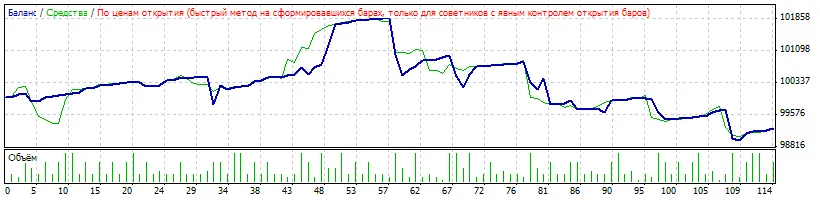
After optimization, here are the results:
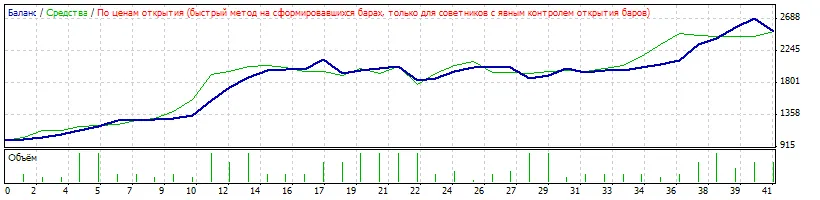
We've also seen promising results on smaller timeframes! The EA comes with fixed default parameters, but you can download the extended version from our magazine. This version allows you to adjust and optimize parameters, including adaptive levels for take profit and stop loss.
Important: Keep in mind that different brokers have varied quote properties, and results may differ based on the parameters you use.




Comments 0