
The Eliot Wave I Expert Advisor (EA) is a handy tool for traders using MetaTrader 4. This EA draws three trend lines on your chart—one main trend line and two smaller ones—using fractals. It executes trades whenever it detects an Eliot retracement. Plus, it features a trailing stop loss and take profit mechanism, making it versatile across all time frames, major forex pairs, and even NASDAQ stocks.
Here's the lowdown on how the Eliot Wave EA works:
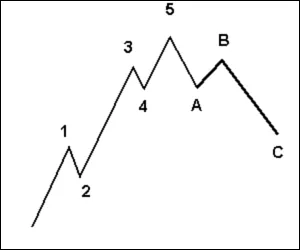
- It follows the principle of five waves moving in the direction of the main trend, followed by three corrective waves. This gives us the classic 5-3 pattern that traders look for.
Key Features to Consider
- Always give it a whirl on a demo account first.
- This EA makes trades based solely on the price of the open candle!
- If you prefer not to increase lot sizes when facing losses, simply set IncreaseFactor=0.
- This EA cleverly combines two moving averages with trend lines.
- Note that the trend lines won’t function in test mode.
- Optimization tests can only be performed with moving averages.
- In live trading, the trend lines and moving averages will work in tandem.
- During testing, the EA only displays the trend lines visually without factoring them into trade execution.
- The trend lines act as filters, enhancing your chances of successful trades.
Input Settings
- Use_TP_In_Money: Set to true/false to use take profit in monetary terms.
- TP_In_Money: Define take profit in money (values: 10-100).
- Use_TP_In_percent: Set to true/false to use take profit in percentage.
- TP_In_Percent: Define take profit percentage (values: 10-100).
- Enable_Trailing: Set to true/false to enable trailing with money.
- Take Profit In Money: Enter amount in current currency (values: 25-200).
- Stop Loss In Money: Define stop loss in current currency (values: 1-20).
- Exit: Close trades if the trend goes against you (values: true/false).
- Lots: Input lot size (values: 0.01-1).
- Lots size Exponent: Set the exponent for lot size (values: 1.01-2).
- IncreaseFactor: Specify how much to increase lots if losing a trade (values: 0.001-0.1).
- Stop_Loss: Define stop loss (values: 30-500).
- MagicNumber: Assign a magic number (values: 1-100000).
- TakeProfit: Set take profit (values: 50-200).
- FastMA: Input fast moving average (values: 1-20).
- SlowMA: Input slow moving average (values: 50-200).
- Mom_Sell: Set momentum sell trigger (values: 0.1-0.9).
- Mom_Buy: Set momentum buy trigger (values: 0.1-0.9).
- UseEquityStop: Set to true/false to use equity stop.
- TotalEquityRisk: Define total equity risk (values: 0.01-20).
- Max_Trades: Set maximum number of trades (values: 1-12).
- USETRAILINGSTOP: Set to true/false to enable trailing stop.
- WHENTOTRAIL: Specify when to trail (values: 40-100).
- TRAILAMOUNT: Define trail amount (values: 40-100).
- Distance From Candle: Set distance from candle (values: 1-100).
- USECANDELTRAIL: Enable trailing stop (true/false).
- X: Number of candles (values: 1-100).
- USEMOVETOBREAKEVEN: Enable break even (true/false).
- WHENTOMOVETOBE: Define when to move to break even (values: 1-30).
- PIPSTOMOVESL: Set how many pips to move stop loss (values: 1-30).
Final Thoughts
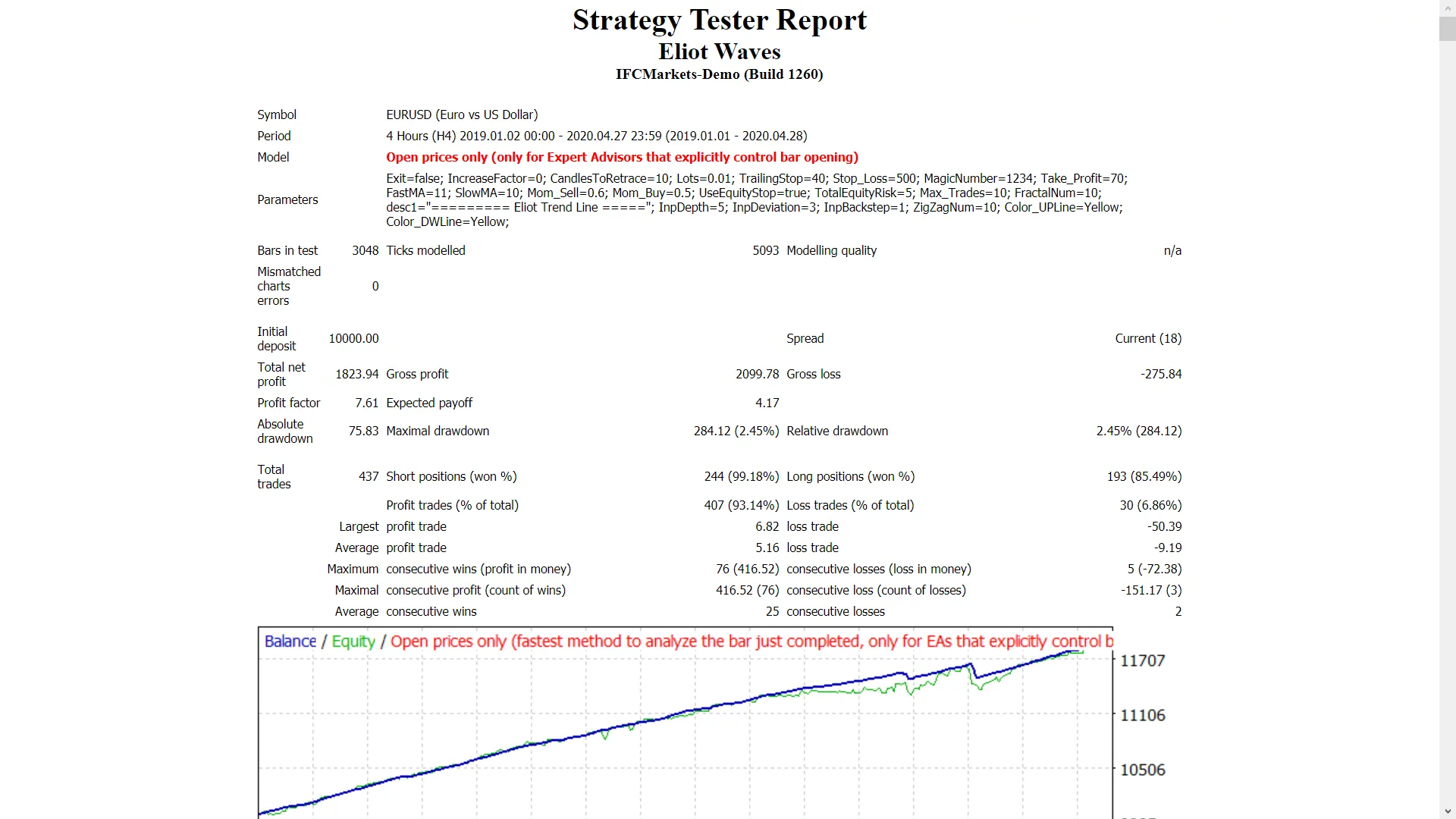
Make sure to optimize this EA every few months using the same input settings mentioned above. You can utilize it as a hedging grid EA or as a single trade EA.
To learn how to backtest this EA effectively, check out this guide: How to Perform Backtest.




Comments 0