
The Moving Average Expert Advisor (EA) is bundled with the standard package of the MetaTrader 5 platform. It's a prime example of how to leverage the Moving Average indicator for trading success.
You'll find the EA file, Moving Average.mq5, tucked away in the folder: terminal_data_folder/MQL5/Experts/Examples/Moving Average/. This EA showcases the use of technical indicators, trade history functions, and trading classes from the Standard Library. Plus, it has a robust money management system that adapts based on trading results.
1. Understanding the EA Structure
Let's take a closer look at how this Expert Advisor is structured and operates:
1.1 EA Properties
//+------------------------------------------------------------------+//| Moving Averages.mq5 |//| Copyright 2009-2013, MetaQuotes Software Corp. |//| https://www.mql5.com |//+------------------------------------------------------------------+#property copyright"Copyright 2009-2013, MetaQuotes Software Corp."#property link "https://www.mql5.com"#property version "1.00"
The first five lines include comments, while the next three set properties for the MQL5 program using preprocessor directives like #property.
When you run the EA, these properties will show up in the "Common" tab:

Figure 1. Common Parameters of the Moving Average EA
1.2 Include Files
The #include directive includes the Trade.mqh file, which is part of the Standard Library and contains the CTrade class for seamless access to trading functions.
#include <Trade/Trade.mqh>The name of the include file is enclosed in brackets <>, indicating that the path is set relative to the directory: terminal_data_folder/Include/.
1.3 Inputs
Following the include, we have the input parameters. Their roles are illustrated in Figure 2.
inputdouble MaximumRisk = 0.02; // Maximum Risk in percentageinputdouble DecreaseFactor = 3 // Decrease factorinputint MovingPeriod = 12 // Moving Average periodinputint MovingShift = 6 // Moving Average shift
The parameters MaximumRisk and DecreaseFactor are used for money management, while MovingPeriod and MovingShift set the period and shift of the Moving Average indicator that checks trade conditions.
The comments next to the input parameters, along with the default values, appear in the "Options" tab instead of just the parameter names:
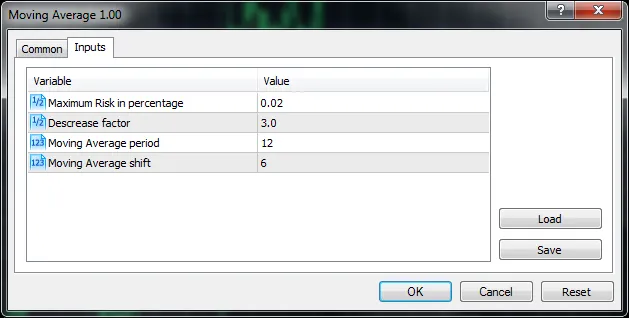
Figure 2. Input Parameters of the Moving Average EA
1.4 Global Variables
The global variable ExtHandle is declared next. This will store the handle of the Moving Average indicator.
//---int ExtHandle=0;
Following this are six functions, each described in comments:
- TradeSizeOptimized() - Calculates the optimal lot size;
- CheckForOpen() - Checks conditions for opening a position;
- CheckForClose() - Checks conditions for closing a position;
- OnInit() - Initializes the Expert Advisor;
- OnTick() - Handles each tick;
- OnDeinit() - Cleans up when the EA is removed;
The last three functions are event-handling functions, while the first three are service functions called within their code.
2. Event Handling Functions
2.1 The OnInit() Initialization Function
The OnInit() function is executed once when the EA starts. It's where we prepare the EA for operation: checking input parameters, initializing indicators, etc. If any critical errors arise, the function exits with a return code of INIT_FAILED.
//+------------------------------------------------------------------+//| Expert initialization function |//+------------------------------------------------------------------+intOnInit(void)
  {
//---
   ExtHandle=iMA(_Symbol,_Period,MovingPeriod,MovingShift,MODE_SMA,PRICE_CLOSE);
   if(ExtHandle==INVALID_HANDLE)
     {
      printf("Error creating MA indicator");
      return(INIT_FAILED);
     }
//---
   return(INIT_SUCCEEDED);
  }
The EA's trading relies on the Moving Average indicator, which is created using iMA(). Its handle is stored in the global variable ExtHandle.
If any errors are encountered, OnInit() exits with the INIT_FAILED code, indicating a proper way to halt the EA/indicator operation during an unsuccessful initialization.
2.2 The OnTick() Function
Every time a new quote comes in for the symbol where the EA is running, the OnTick() function is triggered.
//+------------------------------------------------------------------+//| Expert tick function |//+------------------------------------------------------------------+voidOnTick(void)
  {
//---
   if(PositionSelect(_Symbol))
      CheckForClose();
   else
      CheckForOpen();
//---
  }
The PositionSelect() function checks if there's an open position for the current symbol. If it's open, CheckForClose() is called to analyze the market's current state and potentially close the position. If there are no open positions, CheckForOpen() is summoned to check market conditions for a new trade.
2.3 The OnDeInit() Deinitialization Function
The OnDeInit() function is called when the EA is removed from the chart, allowing for any necessary cleanup.
//+------------------------------------------------------------------+//| Expert deinitialization function |//+------------------------------------------------------------------+voidOnDeinit(constint reason)
  {
  }
//+------------------------------------------------------------------+
No actions are taken during the EA's deinitialization in this case.
3. Service Functions
3.1 Function TradeSizeOptimized()
This function calculates and returns the optimal lot size for opening a position based on the specified risk level and trading results.
//+------------------------------------------------------------------+//| Calculate optimal lot size |//+------------------------------------------------------------------+double TradeSizeOptimized(void)
  {
   double price=0.0;
   double margin=0.0;
//--- Calculate the lot size
   if(!SymbolInfoDouble(_Symbol,SYMBOL_ASK,price))
      return(0.0);
   if(!OrderCalcMargin(ORDER_TYPE_BUY,_Symbol,1.0,price,margin))
      return(0.0);
   if(margin<=0.0)
      return(0.0);

   double lot=NormalizeDouble(AccountInfoDouble(ACCOUNT_FREEMARGIN)*MaximumRisk/margin,2);
//--- calculate the length of the series of consecutive losing trades
   if(DecreaseFactor>0)
     {
      //--- request the entire trading history
      HistorySelect(0,TimeCurrent());
      //--
      int    orders=HistoryDealsTotal();  // the total number of deals
      int    losses=0                    // the number of loss deals in the series

      for(int i=orders-1;i>=0;i--)
        {
         ulong ticket=HistoryDealGetTicket(i);
         if(ticket==0)
           {
            Print("HistoryDealGetTicket failed, no trade history");
            break;
           }
         //--- checking the deal symbol
         if(HistoryDealGetString(ticket,DEAL_SYMBOL)!=_Symbol)
            continue;
         //--- checking the profit
         double profit=HistoryDealGetDouble(ticket,DEAL_PROFIT);
         if(profit>0.0)
            break;
         if(profit<0.0)
            losses++;
    }
      //---
      if(losses>1)
         lot=NormalizeDouble(lot-lot*losses/DecreaseFactor,1);
     }
//--- normalizing and checking the allowed values of the trade volume
   double stepvol=SymbolInfoDouble(_Symbol,SYMBOL_VOLUME_STEP);
   lot=stepvol*NormalizeDouble(lot/stepvol,0);

   double minvol=SymbolInfoDouble(_Symbol,SYMBOL_VOLUME_MIN);
   if(lot<minvol)
      lot=minvol;

   double maxvol=SymbolInfoDouble(_Symbol,SYMBOL_VOLUME_MAX);
   if(lot>maxvol)
      lot=maxvol;
//--- return the value of the trade volume
   return(lot);
  }
The SymbolInfoDouble() function checks the availability of prices for the current symbol, while OrderCalcMargin() requests the margin needed for placing an order. The initial lot size is determined based on the margin required, the free margin in your account (AccountInfoDouble(ACCOUNT_FREEMARGIN)), and the maximum risk specified in MaximumRisk.
If the DecreaseFactor input parameter is positive, the function analyzes historical deals and adjusts the lot size based on the maximum series of losing trades. The final lot size is checked against the minimum and maximum volume limits, ensuring it falls within the acceptable range before returning the calculated trading volume.
3.2. Function CheckForOpen()
CheckForOpen() checks the conditions for opening a position and executes the trade when the conditions are met (in this case, when the price crosses the moving average).
//+------------------------------------------------------------------+//| Check for open position conditions |//+------------------------------------------------------------------+void CheckForOpen(void)
  {
   MqlRates rt[2];
//--- copy the price values
   if(CopyRates(_Symbol,_Period,0,2,rt)!=2)
     {
      Print("CopyRates of ",_Symbol," failed, no history");
      return;
     }
//--- Trade only on the first tick of the new bar
   if(rt[1].tick_volume>1)
      return;
//--- Get the current value of the Moving Average indicator
   double   ma[1];
   if(CopyBuffer(ExtHandle,0,0,1,ma)!=1)
     {
      Print("CopyBuffer from iMA failed, no data");
      return;
     }
//--- check the signals
   ENUM_ORDER_TYPE signal=WRONG_VALUE;

   if(rt[0].open>ma[0] && rt[0].close<ma[0])
      signal=ORDER_TYPE_SELL;    // sell condition
   else
       {
      if(rt[0].open<ma[0] && rt[0].close>ma[0])
         signal=ORDER_TYPE_BUY;  // buy condition
     }
//--- additional checks
   if(signal!=WRONG_VALUE)
      if(TerminalInfoInteger(TERMINAL_TRADE_ALLOWED))
         if(Bars(_Symbol,_Period)>100)
           {
            CTrade trade;
            trade.PositionOpen(_Symbol,signal,TradeSizeOptimized(),
                               SymbolInfoDouble(_Symbol,signal==ORDER_TYPE_SELL ? SYMBOL_BID:SYMBOL_ASK),
                               0,0);
           }
//---
  }
When trading with the moving average, you need to monitor when the price crosses it. The CopyRates() function copies the current prices into the rt[] array, where rt[1] refers to the current bar and rt[0] refers to the completed bar.
A new bar is identified by checking the tick volume of the current bar. If it's equal to 1, a new bar has started. However, this method can sometimes fail if quotes come in bursts. To ensure accuracy, the time of the current quote should be saved and compared (check out IsNewBar for details).
The current Moving Average value is fetched using CopyBuffer() and saved in the ma[] array. The program then checks if the price has crossed the moving average and performs additional checks (such as whether trading is allowed and if there are bars in history). If everything checks out, an appropriate position for the symbol is opened using the PositionOpen() method of the trade object.
The opening price for the position is set using SymbolInfoDouble(), which provides either the Bid or Ask price based on the signal variable. The position's volume is determined by calling TradeSizeOptimized() as described earlier.
3.3 Function CheckForClose()
CheckForClose() verifies the conditions for closing a position and executes the closure if the criteria are met.
//+------------------------------------------------------------------+//| Check for close position conditions |//+------------------------------------------------------------------+void CheckForClose(void)
  {
   MqlRates rt[2];
//--- Copy price values
   if(CopyRates(_Symbol,_Period,0,2,rt)!=2)
     {
      Print("CopyRates of ",_Symbol," failed, no history");
      return;
     }
//--- Trade only on the first tick of the new bar
   if(rt[1].tick_volume>1)
      return;
//--- get the current value of the Moving Average indicator
   double   ma[1];
   if(CopyBuffer(ExtHandle,0,0,1,ma)!=1)
     {
      Print("CopyBuffer from iMA failed, no data");
      return;
     }
//--- get the type of the position selected earlier using PositionSelect()
   bool signal=false;
   long type=PositionGetInteger(POSITION_TYPE);

   if(type==(long)POSITION_TYPE_BUY   && rt[0].open>ma[0] && rt[0].close<ma[0])
      signal=true;
   if(type==(long)POSITION_TYPE_SELL  && rt[0].open<ma[0] && rt[0].close>ma[0])
      signal=true;
//--- additional checks
   if(signal)
      if(TerminalInfoInteger(TERMINAL_TRADE_ALLOWED))
         if(Bars(_Symbol,_Period)>100)
           {
            CTrade trade;
            trade.PositionClose(_Symbol,3);
           }
//---
  }
The algorithm in CheckForClose() mirrors that of CheckForOpen(). Depending on the direction of the currently open positions, the function checks if conditions for closure are met (price crossing the MA downwards for buys or upwards for sells). An open position is closed using the PositionClose() method of the trade object.
4. Backtesting
To find the best parameter values, you can utilize the Strategy Tester within MetaTrader 5.
For instance, optimizing the MovingPeriod parameter between 2012.01.01 and 2013.08.01 yields the best results with MovingPeriod=45:
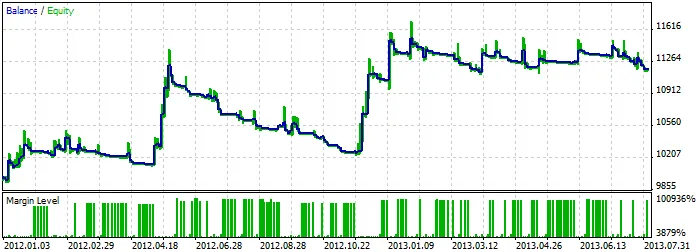
Backtesting Results of the Moving Average Expert Advisor
Conclusions
The Moving Average Expert Advisor, included with the standard package of the MetaTrader 5 terminal, serves as a practical example of using technical indicators, trading history functions, and trade classes from the Standard Library. Moreover, the EA incorporates a money management system that adapts based on trading outcomes.
With this guide, you should be better equipped to navigate the Moving Average EA and optimize your trading strategies!




Comments 0