
Idea by: Vladimir Khlystov.
MQL5 code by: Vladimir Karputov.
The EA is designed to track breakdowns across various timeframes, from 1 minute to 1 month. It checks the first bar for a breakdown at the specified timeframe called Previous Candle Breakdown. Additionally, you can enable two filters using a Moving Average for enhanced trading precision.
This EA includes trailing functionality, which adjusts the Stop Loss to breakeven upon the first modification of the Stop Loss level, helping to secure your trades.
You can set your position size in two ways: either as a fixed amount (Lots over zero with Risk set to zero) or dynamically calculated based on a percentage of risk per trade (Risk above zero with Lots set to zero).
WARNING! Ensure that you don’t configure both:
- Both "Lots" and "Risk" set above zero;
- Both "Lots" and "Risk" set to zero.
Once your target profit is reached (when Close all positions when profit is achieved is activated), all positions will close automatically. The EA ensures that only one position per direction is active at the specified timeframe defined by Previous Candle Breakdown.
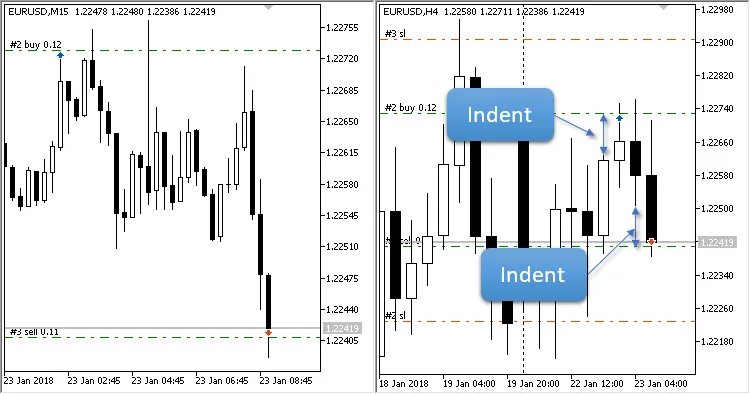
Fig. 1. Current timeframe: M15, breakdown set to H4
Input Parameters
- Previous Candle Breakdown - timeframe of the candlestick to be broken down;
- Indent from High or Low - distance from the High and Low of the broken candlestick;
- Fast: av. period - Moving Average "Fast": Averaging period; set to zero to disable filters from "Fast" and "Slow" indicators;
- Fast: horizontal shift - Moving Average "Fast": Horizontal shift of the indicator;
- Fast: type of price - Moving Average "Fast": Type of price used for the indicator calculations;
- Slow: av. period - Moving Average "Slow": Averaging period; set to zero to disable filters from "Fast" and "Slow" indicators;
- Slow: horizontal shift - Moving Average "Slow": Horizontal shift of the indicator;
- Slow: type of price - Moving Average "Slow": Type of price used for the indicator calculations;
- Fast and Slow: smoothing type - averaging type applicable to both "Fast" and "Slow";
- Stop Loss - Stop Loss setting;
- Take Profit - Take Profit setting;
- Trailing Stop - trailing stop feature (functions as breakeven on the first modification of Stop Loss);
- Trailing Step - trailing step value;
- Lots - fixed lot size (set Risk to zero);
- Risk - dynamically calculated lot size based on risk percentage per trade (set Lots to zero);
- Maximum number of positions in one direction - limits the number of positions in a single direction;
- Close all positions when profit is achieved - target profit level for closing all positions.




Comments 0