
If you're looking for a straightforward solution to manage your trades, the Simple TPSL Panel for MetaTrader 5 is just what you need. This EA (Expert Advisor) is all about simplicity, making it easy for traders of all levels to use without any frills.
With this panel, you can effortlessly set your Take Profit (TP) and Stop Loss (SL) levels. Unlike other tools, it doesn’t send these limits as pending orders; instead, it acts immediately when triggered, executing an order with a single click.
Once you set it to 'run', it automatically detects any open positions—whether you're in a BUY or SELL trade. The panel keeps an eye on the current price and, when it hits your designated TP or SL, it’ll execute a counter trade right away. Plus, you’ll receive alert messages if there’s any hiccup, like trying to set a limit with an incorrect price range. The panel even has a cool shadow effect that changes from gray to black, keeping you in sync with price tick changes.
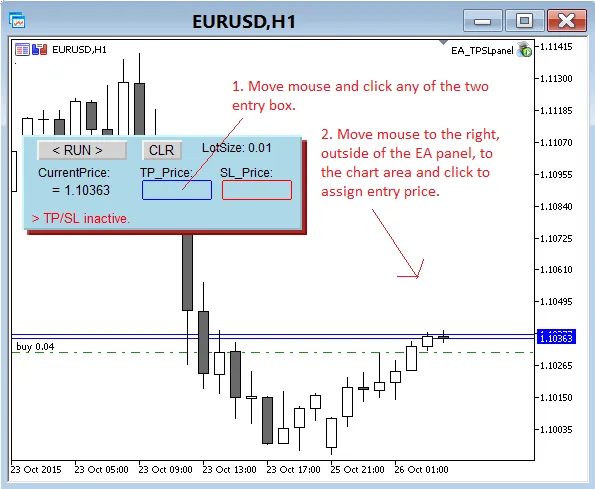
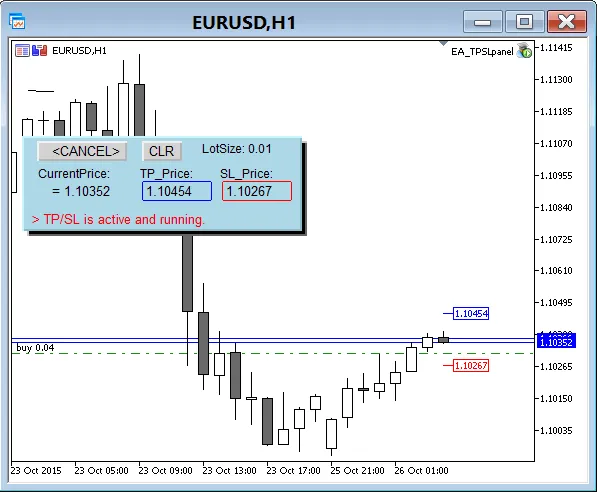
Quick Tips:
- Keep in mind that since the TP/SL runs on the EA, any interruptions—like changing the chart's time period or shutting down the terminal—will halt its operation due to initialization.
- Before you hit the run button, double-check that you've set the correct lot size for the EA to effectively counter your open positions.
- Don’t forget to enable automated trading in your terminal’s Expert Advisor settings; otherwise, the orders won’t go through when triggered.




Comments 0