
If you're looking to get an edge in your trading game, then the virtual trailing stop is a tool you definitely want to consider. This nifty feature allows you to set your stop loss and take profit levels without your broker knowing your exact plans. Instead of being placed in the dealing center, these stops are managed directly on your computer, keeping your strategies under wraps.
One of the standout benefits of using a virtual trailing stop is its ability to bypass the often hefty spreads and stop levels that many brokers impose. With this system, those limitations become a non-issue.
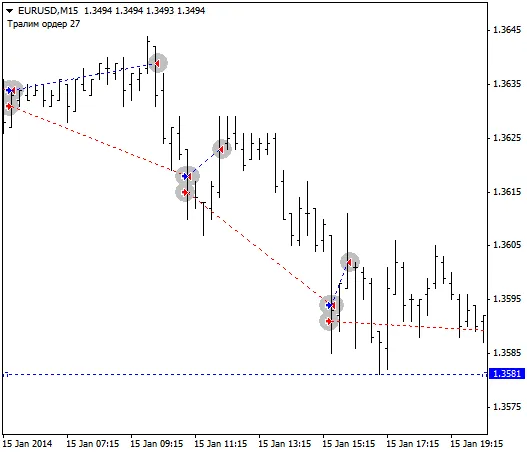
Now, while the concepts of Stop Loss and Take Profit might be straightforward for most traders, the Trailing Stop is where things get a bit more intricate.
The trailing stop operates based on three key parameters:
- Length of the trailing stop: This defines how far away the stop loss will trail the price.
- Minimum profit to trigger: This is the profit level that must be reached before the virtual stop loss is activated.
- Step of the trailing stop: This determines how often the stop loss is adjusted as the price moves.
For instance, let's say you've set your trailing stop values to 5, 2, and 3 respectively. Once your trade hits a profit of 7 points, the virtual stop loss will automatically adjust to the order's opening price plus 2 points of minimum profit. As the price continues to rise by 3 points, the stop loss will shift to 5 points of profit, continuously following the price at that distance. If the market pulls back to your stop level, your order will close, protecting your gains.
In the MetaTrader 4 platform, trailing stops are visually represented as dotted lines, making it easier to track your adjustments.
Looking ahead, there are exciting developments on the horizon. Future updates aim to allow manual adjustments of the trailing stop line during active trades, providing even more flexibility. Additionally, support for multiple orders per side is in the works. Currently, the Trailing Stop is optimized for one order at a time; however, it won’t close losing positions even if you have multiple orders open in either direction.
To really grasp how the Expert Advisor works, you can test it out in the strategy tester. Just switch to Visualization mode, and you’ll see it in action!




Comments 0