
Hey there, fellow traders! Today, I want to talk about a nifty tool that can really streamline your trading process in MetaTrader 4: the Virtual_SL_TP_Pending_with_SL_Trailing.mq4. This script is designed to help you manage your trades more effectively by setting virtual stop loss and take profit levels, along with a pending order that features a trailing stop loss option.
Let’s Dive Into the Details
Here’s a quick rundown of what this script offers:
- Copyright and Link: It includes copyright information and a link to the creator's website, so you know where to find more resources.
- Version: The script indicates its version, which is handy for tracking updates.
- Description: You’ll get insights about the script, including the creator's email, intellectual property notes, and a friendly reminder to use it at your own risk.
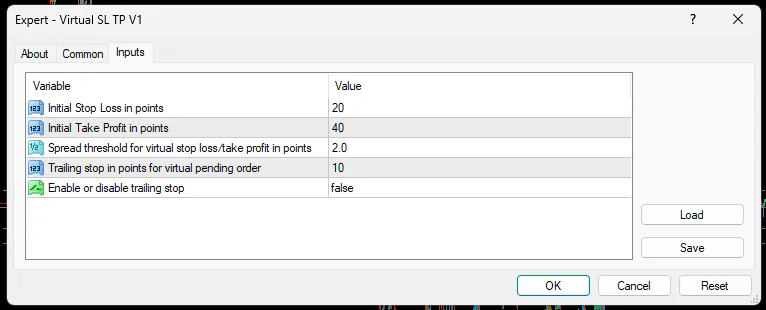
- Input Parameters: These are external variables that let you customize how the Expert Advisor (EA) behaves, including:
- StopLossPoints: Set your initial stop loss in points.
- TakeProfitPoints: Define your initial take profit in points.
- SpreadThreshold: Set the spread threshold for your virtual stop loss/take profit in points.
- TrailingStopPoints: Determine the trailing stop in points for your virtual pending order.
- EnableTrailing: Choose whether to enable or disable the trailing stop feature.
- Global Variables: These are used throughout the script to store important data like initial spread, virtual stop loss, take profit, and pending order prices.
- Initialization Function (OnInit): This function kicks in when the EA is attached to a chart, calculating initial virtual stop loss, take profit, and pending order price based on your input settings.
- Tick Function (OnTick): This function runs with every tick of the price. It checks if the spread has increased beyond your set threshold and adjusts the virtual stop loss, take profit, and pending order price as needed. It also monitors price movements to close positions at your virtual stop loss or take profit. Plus, if you have trailing stops enabled and the price hits your pending order price, it will place a virtual pending order with a trailing stop loss.
- Close Position Function (ClosePosition): This function will close your position once the price touches the virtual stop loss or take profit.
- Place Pending Order Function (PlacePendingOrder): This function places a virtual pending order with a trailing stop loss if you've enabled the trailing option.
This EA is a fantastic way to automate your trade management process using virtual levels and a trailing stop feature, making it easier for you to focus on your trading strategy. Happy trading!




Comments 0