
Idea by: Iurii Tokman.
MQL5 code by: Vladimir Karputov.
This Expert Advisor (EA) utilizes two indicators: the Moving Average (MA) and the Relative Strength Index (RSI). It waits for a new bar to form before making any trade decisions and will manage open positions by trailing stops and closing them at every tick as needed.
Here’s a unique twist: the Slow MA's averaging period is double that of the Fast MA's, while the RSI period matches the Fast MA. This approach simplifies the optimization process by reducing the number of parameters you need to juggle.
You can also customize the comparison signs in the signal identification formula. This is done by introducing specific variables like InpMoreLessBuy_1, InpMoreLessBuy_2, InpMoreLessBuy_3, InpMoreLessSell_1, InpMoreLessSell_2, and InpMoreLessSell_3. The modified formula looks like this:
 bool signal_buy=(!InpMoreLessBuy_1  ?  ArrayFast[1]<ArraySlow[1]:  ArrayFast[1]>ArraySlow[1]) &&
                   (InpMoreLessBuy_2   ?  ArrayFast[0]>ArraySlow[0]:  ArrayFast[0]<ArraySlow[0]) &&
                   (InpMoreLessBuy_3   ?  RSI>InpRSI_level_UP      :  RSI<InpRSI_level_UP);
   bool signal_sell=(InpMoreLessSell_1 ?  ArrayFast[1]>ArraySlow[1]:  ArrayFast[1]<ArraySlow[1]) &&
                    (!InpMoreLessSell_2?  ArrayFast[0]<ArraySlow[0]:  ArrayFast[0]>ArraySlow[0]) &&
                    (!InpMoreLessSell_3?  RSI<InpRSI_level_DOWN    :  RSI>InpRSI_level_DOWN);
Input Parameters
Moving Average Parameters:
- Fast: av. period - Averaging period for the "Fast" MA;
- Fast: horizontal shift - Horizontal shift for the "Fast" MA;
- Fast: price type - Price type for the "Fast" MA;
- Slow: horizontal shift - Horizontal shift for the "Slow" MA;
- Slow: price type - Price type for the "Slow" MA;
- Fast and Slow: smoothing type - Averaging type (applies to both "Fast" and "Slow").
RSI Parameters:
- RSI: price type - Price type for RSI;
- RSI: level UP - Upper level for RSI;
- RSI: level DOWN - Lower level for RSI.
Trading Parameters:
- Stop Loss - Stop Loss (set to zero to disable);
- Take Profit - Take Profit (set to zero to disable);
- Trailing Stop - Trailing (set to zero to disable);
- Trailing Step - Trailing step;
- Lots - Permanent lot size (set Lots above zero and Risk to zero);
- Risk - Dynamic lot size (set Risk above zero and Lots to zero);
- Maximum number of positions in one direction - Limit for trades in one direction (set to zero to disable);
- Close all positions when profit is achieved - Close positions at profit (set to zero to disable);
- Close opposite positions - Close opposite positions (set to "false" to disable);
- Magic number - Unique identifier for the EA.
This EA provides flexibility in setting up your indicator parameters while also allowing you to configure (or disable) Stop Loss, Take Profit, Trailing, and other trading variables. You can choose to trade with a fixed lot size or have the EA calculate the lot size dynamically based on your risk preference.
Optimization Recommendations
For optimal results, use the "OHLC on M1" mode, selecting a symbol and setting the timeframe to M15. Disable Stop Loss, Take Profit, and Trailing by setting them to zero, and limit the maximum number of positions in each direction to "1." Alternatively, you can use the provided Two MA one RSI M15 Start.set file for initial optimization parameters, located in your MQL5\Profiles\Tester\ folder.
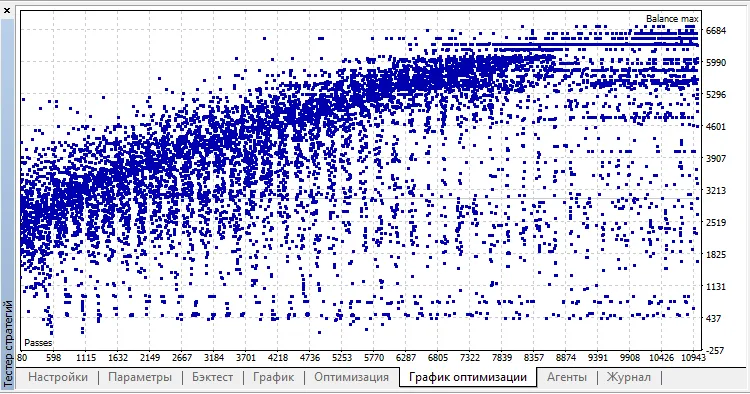
Set the optimization type to "Fast (genetic algorithm)" and target "Balance max" for optimization.
For an efficient optimization experience, consider utilizing the MQL5 Cloud Network. For example, optimizing the USDJPY for the year 2017 using the cloud combined with my quad-core laptop took just:
2018.05.28 08:03:19.923 optimization done in 7 minutes 58 seconds
And it only cost me $0.08.




Comments 0