
Welcome back, traders! Today, we're diving into a handy tool that can streamline your trading experience: the Close by Button EA for MetaTrader 5.
What’s this EA all about?
This EA is a modified version of a classic tool that provides you with enhanced control over your trades. You can find the original here.
Getting Started:
- First off, add this EA to any trading symbol you wish to use.
- Next, set your preferred parameters for Take Profit (TP), Stop Loss (SL), trailing stops, and the thresholds for both profit and loss.
- This EA doesn’t rely on a specific Magic Number, meaning it can adjust orders placed from your mobile device automatically (including SL, TP, and trailing stops).
Key Features:
- Five Separate Buttons: This EA comes equipped with five handy buttons for easy management.
- Auto-Close on Profit: Set the parameter "CLOSE IF PROFIT-xxxx" (fill with 0 to disable). For example, filling it with 100.0 means all orders will close automatically when your profit reaches $100.
- Auto-Close on Loss: Similar to the profit feature, set "CLOSE IF LOSS-xxxx" (also fill with 0 to disable). For instance, filling it with -70.0 will close all orders when your loss hits -$70.
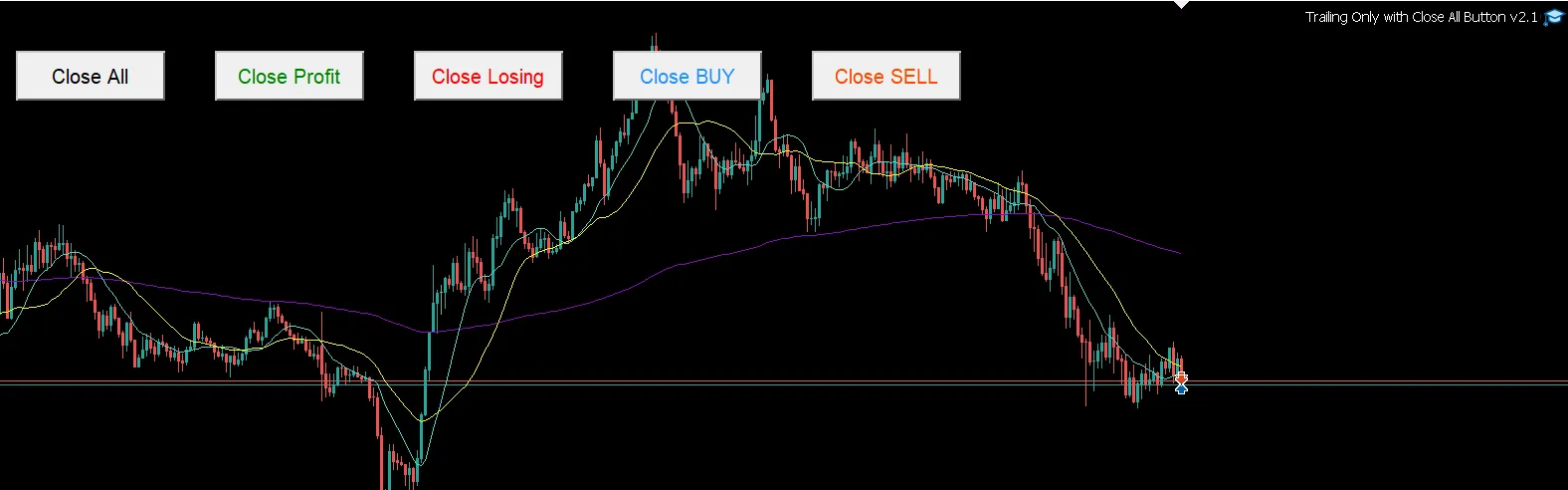
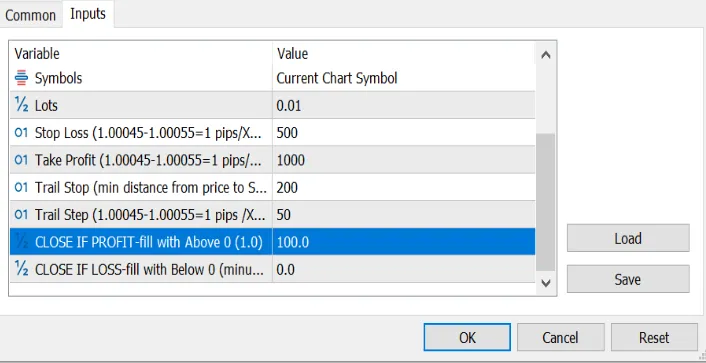
Remember, filling in 0.0 will deactivate these functions!
Wishing you all a successful trading experience!
Update History:
- Added buttons to Close BUY and Close SELL
- Removed the unused parameter Lots




Comments 0