
Welcome, fellow traders! Today, we’re diving into a fascinating trading system designed to capitalize on trending markets using the Color3rdGenXMA Moving Average.
When using this system, the decision to enter a trade is made at a specific moment in time, defined by two key input parameters in the Expert Advisor:
input Hour       StartHour=H08;      // Hour to open a position
input Min         StartMinute=M00;    // Minute to open a position
Regardless of the trading results, after a specified number of minutes (defined by the TimeMin parameter in the Expert Advisor), the open position will close. The direction of the trade is determined by the color of the Color3rdGenXMA indicator at the time of entry. If the indicator is red, we’re going short; if it’s blue, we’re going long.
To get started, simply place the Color3rdGenXMA.ex5 compiled file into your terminal_data_folder\MQL5\Indicators.
Keep in mind that the TradeAlgorithms.mqh library file is tailored for use with Expert Advisors from brokers that offer non-zero spreads and allow you to set both Stop Loss and Take Profit when opening a position. If you need alternative versions of this library, you can find them here.
The test results displayed below utilized the default input parameters of the Expert Advisor, and note that neither Stop Loss nor Take Profit was employed during these tests.
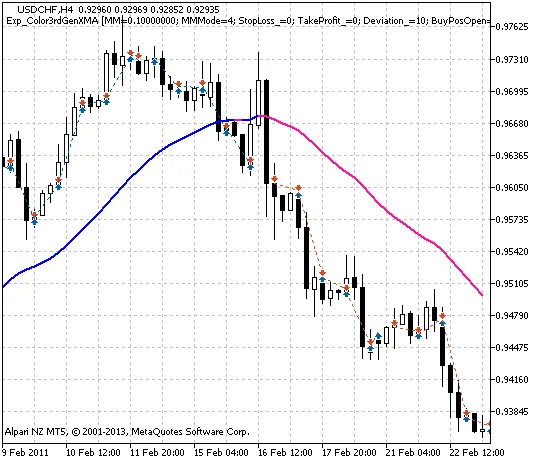
Fig. 1. The instances of history of deals in the chart
Here are the testing results for the year 2011 on the USDCHF H4 pair:
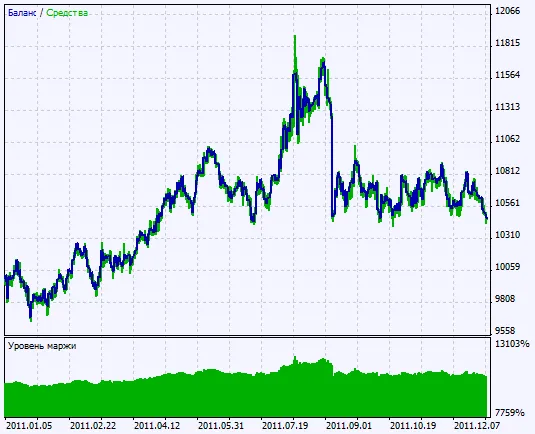
Fig. 2. Chart of testing results




Comments 0