
Understanding the MA on Momentum EA
This Expert Advisor (EA) operates based on signals generated by the custom indicator MA on Momentum. Specifically, it looks for the intersection of two lines on the indicator. A 'BUY' signal is only triggered if this intersection occurs below the '100' level, while a 'SELL' signal is triggered only if it crosses above '100'.
IMPORTANT: 'Take Profit' is measured in points (for example, 1.00055 - 1.00045 = 10 points), and 'Stop Loss' is measured in monetary value.
Positions can be closed when either the 'Take Profit' level is hit (set in points) or the 'Stop Loss' is reached (set in monetary value). Please note that this EA does not utilize a trailing stop.
How to Optimize Your Expert Advisor
For initial optimization, consider the following parameters:
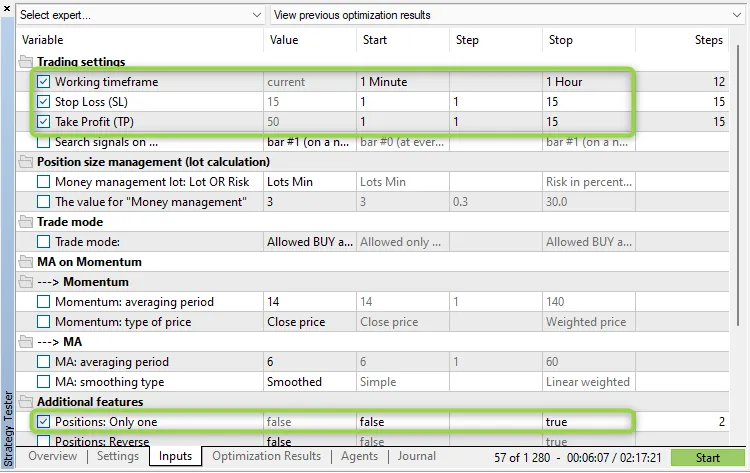
Figure 1: MA on Momentum Min Profit
Key Features:
- The EA can be optimized for your chosen trading timeframe.
- Only one trade can be executed per bar (this is an internal rule and is not part of the input parameters).
- When using the 'inside bar' mode (with the parameter 'Search signals on ...' set to 'bar #0 (at every tick)'), the current bar is referred to as bar #0. Conversely, in the 'only at the moment of birth of a new bar' mode (with 'Search signals on ...' set to 'bar #1 (on a new bar)'), the current bar is identified as bar #1.
Now, let’s delve into the different parameter groups:
Trading Settings:
'Working timeframe' refers to the timeframe on which indicators are generated and where new bars are identified. Set your Stop Loss, Take Profit, and Trailing Stop in Points. Any of these parameters ('Stop Loss', 'Take Profit', 'Trailing Stop') can be disabled by setting the respective parameter to '0.0'. How the trailing feature works is demonstrated in the TrailingStop code.
Position Sizing and Management:
Position sizing can be static ('Money management' set to 'Constant lot' with the lot size specified in 'The value for "Money management"') or dynamic—risking a certain percentage per trade ('Money management' set to 'Risk in percent for a deal' with the risk percentage defined in 'The value for "Money management"'). You can also set a constant lot size at the minimum level ('Money management' set to 'Lots Min').
Additional Features:
The setting 'Positions: Only one' set to 'true' limits the EA to holding just one position at a time.
CAUTION: Setting 'Positions: Only one' to 'true' does not override the 'Positions: Close opposite' setting if it’s also set to 'true'! In simpler terms, any opposite positions will be closed first.
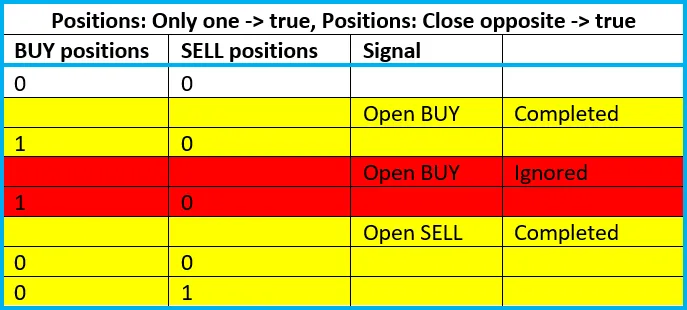
The 'Positions: Reverse' flag is used for reversing signals. Additionally, the 'Positions: Close opposite' feature ensures that any opposite positions are cleared before a new one is opened. The 'Print log' option generates a detailed log of all actions taken. The 'Freeze and StopsLevels Coefficient' parameter sets a coefficient for stop and freeze levels when these values are zero for a particular symbol, with a recommended value of '3'.




Comments 0