
Description:
Have you ever wished for an easier way to generate trading strategies? With the MQL5 Wizard, now you can! This handy tool allows you to automatically create Expert Advisor (EA) code by leveraging various trading signals, position tracking, and effective money management techniques. By utilizing the Standard Library of trading signals, you can craft and backtest your own trading systems with ease. All it takes is writing a module of trading signals.
For an in-depth look at indicators and trading strategies, check out the book The Strategies of the Best Traders in the World. While it’s in Russian, it dives into technical analysis using tools like the MetaStock software. It covers not only traditional trading signals but also those that combine reversal candlestick patterns with confirmations from indicators like Stochastic, CCI, MFI, and RSI.
By combining reversal candlestick patterns with oscillator signals, you can significantly cut down on false signals and boost your trading system's effectiveness.
In previous articles, we've explored trading signals derived from candlestick patterns confirmed by the Stochastic indicator. Here’s a quick recap:
- 3 Black Crows/3 White Soldiers
- Dark Cloud Cover/Piercing Line
- Bullish Engulfing/Bearish Engulfing
- Bullish Harami/Bearish Harami
- Hammer/Hanging Man
- Bullish/Bearish Meeting Lines
- Morning/Evening Stars
In this piece, we’ll delve into how to effectively apply these models alongside Stochastic indicator signals.
1. Identifying Bullish and Bearish Candlestick Patterns
CandlePattern class offers functions to detect various bullish and bearish candlestick patterns (excluding the Hammer/Hanging Man combo).
The formation of a bearish candlestick pattern is checked using the CheckPatternAllBullish() function:
//+------------------------------------------------------------------+//| Checks formation of bullish patterns                                            |//+------------------------------------------------------------------+bool CCandlePattern::CheckPatternAllBullish()
  {
   return(CheckPatternThreeWhiteSoldiers()  ||
          CheckPatternPiercingLine()       ||
          CheckPatternMorningDoji()        ||
          CheckPatternBullishEngulfing()   ||
          CheckPatternBullishHarami()      ||
          CheckPatternMorningStar()        ||
          CheckPatternBullishMeetingLines());
  }
To check for a bullish candlestick pattern, use the CheckPatternAllBearish() function:
//+------------------------------------------------------------------+//| Checks formation of bearish patterns                             |//+------------------------------------------------------------------+bool CCandlePattern::CheckPatternAllBearish()
  {
   return(CheckPatternThreeBlackCrows()     ||
          CheckPatternDarkCloudCover()     ||
          CheckPatternEveningDoji()        ||
          CheckPatternBearishEngulfing()   ||
          CheckPatternBearishHarami()      ||
          CheckPatternEveningStar()        ||
          CheckPatternBearishMeetingLines());
  }
2. Trading Signals Using the Stochastic Indicator
To open a long or short position, a bullish or bearish candlestick model needs to form alongside confirmation from the Stochastic oscillator. Specifically, the %D signal line must be above or below the critical levels of 30 and 70.
An exit signal can occur in two scenarios:
- When an opposing candlestick pattern appears (a bearish one for long positions and a bullish one for shorts).
- Based on the behavior of %D. If %D hits the opposing market level (80 for longs and 20 for shorts) or fails to confirm the reversal signal while reaching 20 for longs and 80 for shorts.
Market entry and exit conditions are checked through:
- int CCP_Stoch::LongCondition() - for checking long position entry (m_pattern_0) and short position exit (m_pattern_1);
- int CCP_Stoch::ShortCondition() - for checking short position entry (m_pattern_0) and long position exit (m_pattern_1).
2.1. Opening a Long Position and Closing a Short One
A long position is signaled by a bullish candlestick combination while fulfilling the StochSignal(1)Stochastic indicator is below 30).
A short position closes when a bullish candlestick pattern forms or when the indicator line crosses above the 20-level or the 80-level.
//+------------------------------------------------------------------+//| Method of checking if the market models are formed               |//| Checks conditions for                                            |//| entry (open short position, m_pattern_0)                         |//| exit  (close long position, m_pattern_1)                         |//+------------------------------------------------------------------+int CCP_Stoch::LongCondition()
  {
   int res=0;
//---- check conditions to open short position//---- formation of bullish pattern and signal line of Stochastic indicator<30
   if(CheckPatternAllBullish() && (StochSignal(1)<30)) res=m_pattern_0; // signal to open long position //--- check conditions of short position closing//--- formation of bearish pattern or crossover of the signal line (upward 20, upward 80)
   if(CheckPatternAllBullish() ||
      ((StochSignal(1)>20) && (StochSignal(2)<20)) ||
      ((StochSignal(1)>80) && (StochSignal(2)<80)))    res=m_pattern_1; // signal to close short position//---
   return(res);
  }
2.2. Opening a Short Position and Closing a Long One
A short position is signaled by a bearish candlestick pattern forming with StochSignal(1)>70 condition (the %D signal line of the Stochastic indicator exceeding 70).
A long position closes when a bearish candlestick pattern appears or the indicator line crosses below the 80-level or the 20-level.
//+------------------------------------------------------------------+//| Method of checking if the market models are formed               |//| Checks conditions for                                            | //| entry (open short position, m_pattern_0)                         |//| exit  (close long position, m_pattern_1)                         |//+------------------------------------------------------------------+int CCP_Stoch::ShortCondition()
  {
   int res=0;
//--- check conditions to open short position//---- formation of bearish pattern and signal line of Stochastic indicator>70
   if(CheckPatternAllBearish() && (StochSignal(1)>70)) res=m_pattern_0; // signal to open short position //--- check conditions of long position closing //---- formation of bearish pattern or crossover of the signal line (downward 80, downward 20)
   if(CheckPatternAllBearish() ||
      ((StochSignal(1)<80) && (StochSignal(2)>80)) ||
      ((StochSignal(1)<20) && (StochSignal(2)>20)))    res=m_pattern_1; // signal to close long position //---
   return(res);
  }
2.3. Creating an EA Using MQL5 Wizard for Candlestick Patterns and Stochastic Signals
The CCP_Stoch class isn’t part of the Standard Library, so you’ll need to download the ccp_stoch.mqh file (attached) and place it in the \terminal_folder\Include\Expert\Signal\MySignals directory. Make sure to also copy the candlepatterns.mqh file into the same folder. Relaunch MetaEditor afterwards to access the file in MQL5 Wizard.
To create a trading robot based on this strategy with the MQL5 Wizard, select the Signals based on Candlestick Patterns+Stochastic signal type during the second step:
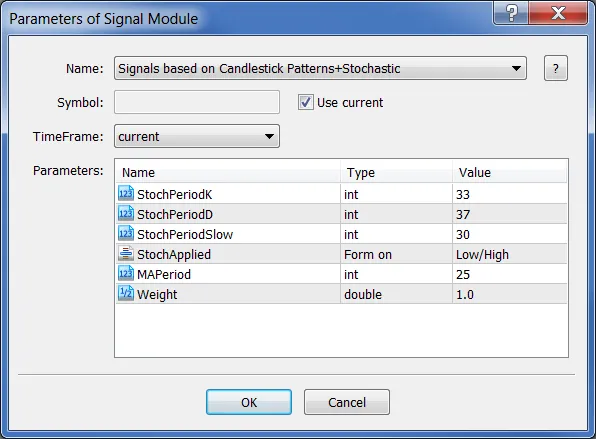
Fig. 1. Choosing "Signals based on Candlestick Patterns+Stochastic" in MQL5 Wizard
In the following steps, specify your desired trailing stop type and money management approach. The EA code will be generated automatically, and all that's left to do is compile it for testing.
2.4. Testing Results
The testing results of the EA on historical data (EURUSD H1, testing period: 1.1.2000-02.02.2011) show promising outcomes. Settings used were PeriodK=33, PeriodD=37, PeriodSlow=30, and MA_period=25.
This EA operates with a fixed trading volume of 0.1 lots (Trading Fixed Lot) and does not utilize a trailing stop (Trailing not used).
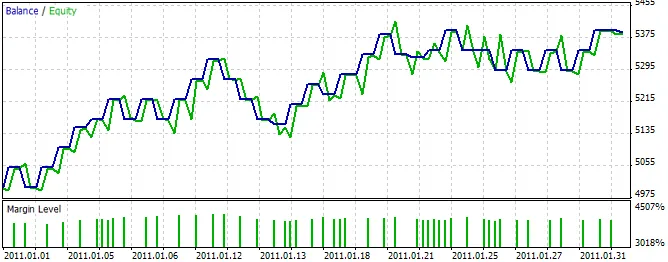
Fig. 2. Testing results for the EA based on Signals from Candlestick Patterns+Stochastic
You can find the best trading parameters using the MetaTrader 5 Strategy Tester.
The code for the Expert Advisor generated by MQL5 Wizard is included in the expert_cp_stoch.mq5 file.




Comments 0