
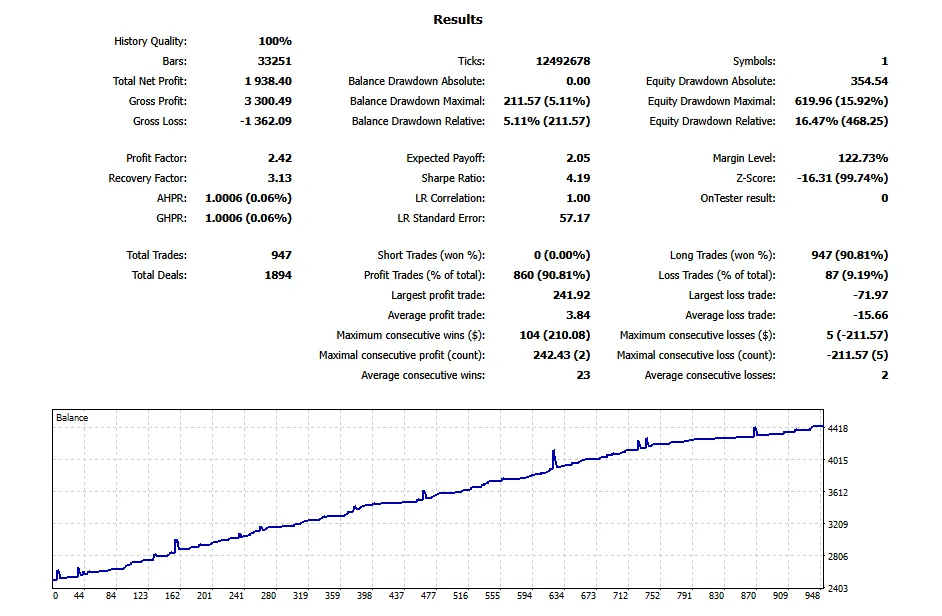
Understanding Babi Ngepet EA Parameters
Welcome to the world of automated trading! Today, we're diving into the Babi Ngepet Expert Advisor (EA) for MetaTrader 5. This nifty tool is designed to help you navigate the complex waters of trading with ease.
General Parameters
First up, let’s talk about the general parameters that allow you to customize the EA to your trading style:
| Parameter | Type | Description |
|---|---|---|
| MagicNumber | int | This is your EA's unique identifier for keeping track of trades. |
| InitialLot | double | Start with this lot size for your very first trade. |
| AllowBuy | bool | Toggle to permit the EA to execute Buy trades. |
| AllowSell | bool | Toggle to permit the EA to execute Sell trades. |
| TakeProfit | int | Set a fixed Take Profit (in pips) for pending orders. |
| FindHighLowBackBars | int | Look back this many bars to find the highest high and lowest low. |
| ResetAfterBars | int | Delete and reevaluate initial pending orders after this many bars if no position is open. |
Martingale Strategy Parameters
Next, let’s explore the Martingale strategy, which can be a bit of a double-edged sword:
| Parameter | Type | Description |
|---|---|---|
| ReverseMartingale | bool | Choose whether to open subsequent trades in the opposite direction of the last one. |
| LotMultiplier | double | This multiplies the lot size for the next trade in a losing series. |
| SecureProfitMartingaleTarget | double | The total floating profit at which all trades in the series will close. |
| DistanceMartingalePips | int | The minimum price movement against the last trade before opening a new Martingale trade. |
| MaxTradesInSeries | int | Set the cap on how many trades can be in a single Martingale series. |
Time Strategy Parameters
Time management is crucial in trading, and here’s how you can control it:
| Parameter | Type | Description |
|---|---|---|
| AllowMonday to AllowFriday | bool | Enable or disable trading on specific days of the week. |
| ForbiddenDates | string | List of dates (YYYY.MM.DD) when trading is off-limits. |
Core Functions Overview
Let’s break down some of the key functions that drive Babi Ngepet:
Initialization and Deinitialization
OnInit(): This function sets your EA’s MagicNumber, margin mode, and resets the Martingale status for a fresh start.
OnDeinit(): A simple cleanup function that notifies you when the EA is stopped or removed.
Trading Filters
IsTradingDateAllowed() and IsTradingDayAllowed(): These functions ensure you're trading on the right days.
Opening Trades
OpenTradeLogic(ENUM_ORDER_TYPE type, string tradeComment): This function manages your market orders, validating lot sizes and checking for margin.
Closing Trades
CloseAllPositions(): This iterates through your open positions and closes those initiated by this EA.
Pending Orders
PendingOrders(ENUM_ORDER_TYPE type, double price, double lotSize, string comment): This function handles placing Buy Limit and Sell Limit orders.
Initial Entry Logic
UpdateHighLowAndOrders(): This function sets up your initial entry when no positions are open, looking for the highest high and lowest low.
Main Execution Logic
OnTick(): This is where the magic happens! This function checks time, filters, and executes trades based on your strategy.
Strategy Summary
To wrap things up, the Babi Ngepet EA employs a high-risk, high-reward Martingale strategy alongside breakout and range-reversal tactics:
- Initial Entry: The EA places a Buy Limit just below recent lows and a Sell Limit just above recent highs, anticipating range-bound behavior.
- Trade Management: If a position is at a loss and the price moves against it, the EA opens a new trade in the same direction with a larger lot size.
- Exit Strategy: The EA closes all trades when the secure profit target is reached and resets for a new series.
Warning: Be cautious! The Martingale strategy can lead to significant drawdowns and increased risk of capital loss as lot sizes grow with each losing trade.




Comments 0