
Are you looking to enhance your trading game? Let me introduce you to the BlauTSStochastic trading system, a powerful tool that utilizes the BlauTSStochastic oscillator.
This system makes trade decisions based on key signals: when the histogram changes direction, crosses the zero line, or when the color of the signal line cloud shifts. These indicators can help you pinpoint the right moment to enter the market.
To customize your trading strategy, you can adjust the following input parameter for selecting an entry algorithm:
input AlgMode Mode=twist; // The algorithm for entering the market
To ensure the EA operates smoothly, remember to place the compiled indicator file BlauTSStochastic.ex5 in your terminal's data folder under MQL5\Indicators.
One important note: the TradeAlgorithms.mqh library allows you to use Expert Advisors with brokers that offer non-zero spreads. Plus, you can set your Stop Loss and Take Profit at the time of position opening. If you need other versions of this library, you can grab them from here.
In the tests conducted below, we used the default input parameters for the Expert Advisor. Notably, neither Stop Loss nor Take Profit was employed during these tests.
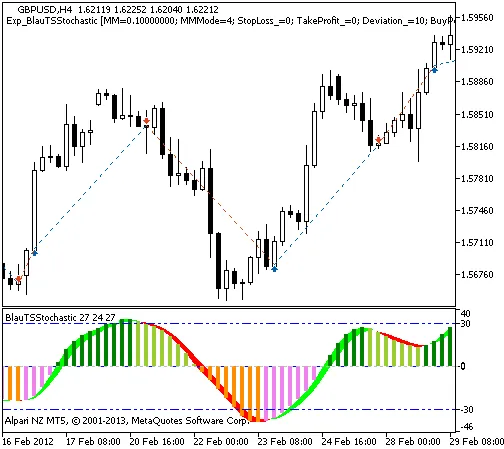
Fig. 1. The instances of history of deals on the chart.
Let’s take a look at the testing results for GBPUSD on the H4 timeframe during 2012-2013:
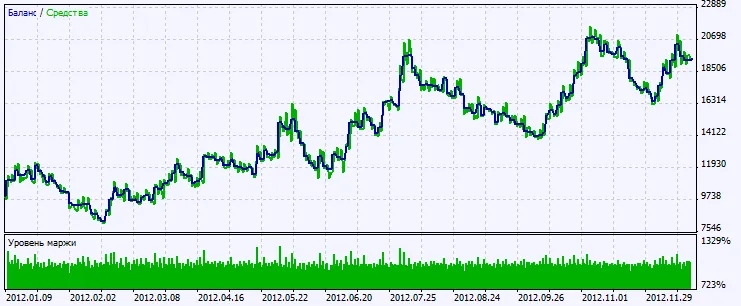
Fig. 2. Chart of testing results




Comments 0