
If you're looking to level up your trading game, let me introduce you to a fantastic tool: the ColorJFatl_Digit Expert Advisor (EA). This EA operates two identical trading systems, one for long trades and the other for short trades. What’s great is that you can configure these systems in various ways, all within one EA. Let’s break it down!
Understanding the Input Parameters
The input parameters are categorized into two main groups:
- L_ Parameters: These are for managing long positions.
- S_ Parameters: These are for managing short positions.
//+----------------------------------------------+//| EA's input parameters for long positions |//+----------------------------------------------+inputuint L_Magic=777; //L magic numberinputdouble L_MM=0.1; //L share of a deposit per tradeinput MarginMode L_MMMode=LOT; //L lot setting mode
//+----------------------------------------------+//| EA's input parameters for short positions |//+----------------------------------------------+inputuint S_Magic=555; //S magic numberinputdouble S_MM=0.1; //S share of a deposit per tradeinput MarginMode S_MMMode=LOT; //S lot setting mode
Each trading system has its own unique magic number, which means they operate independently. The reality is, financial markets aren’t always symmetrical, and often you’ll need different parameters for bullish and bearish conditions. To get started, focus on testing one system at a time. Disable the other system during your initial tests.
inputbool L_PosOpen=true; //L permission to enter long positionsinputbool L_PosClose=true; //L permission to exit long positions
Once you’ve got the first system dialed in, you can do the same for the second one.
Getting Everything Set Up
To ensure your EA runs smoothly, don’t forget to add the compiled ColorJFatl_Digit.ex5 indicator file to your <terminal_data_folder>\MQL5\Indicators.
The tests shown below were conducted using the default input parameters of the EA, with no Stop Loss or Take Profit settings applied.
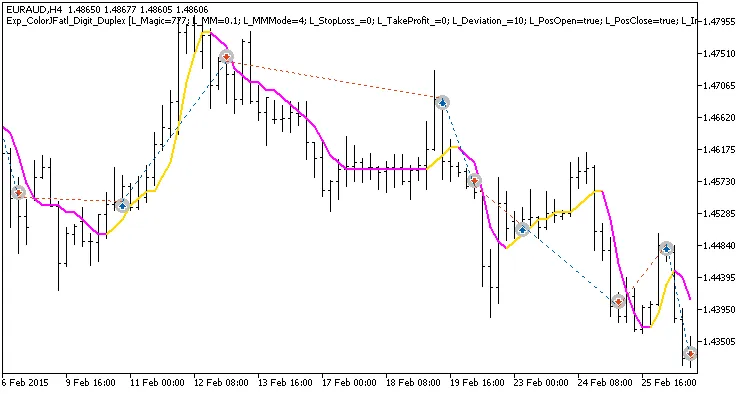
Fig. 1. Examples of trades on the chart with symmetrical settings.
Here are the testing results from 2015 for the EURAUD H4:
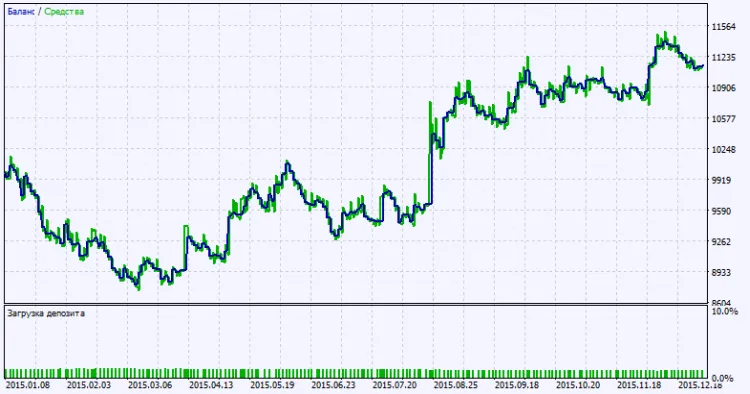
Fig. 2. Testing results chart.
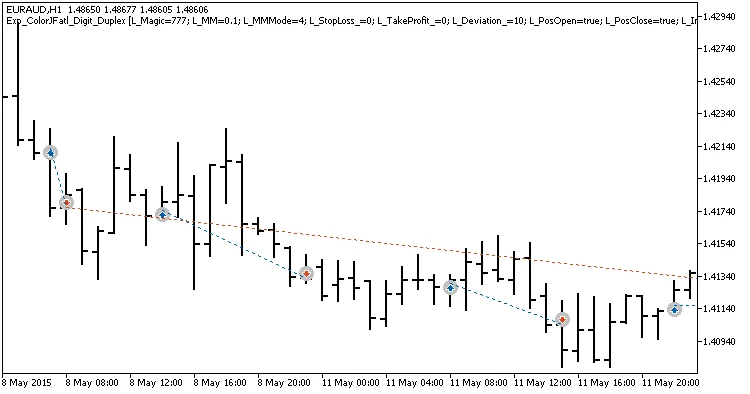
Fig. 2. Examples of trades on the chart with non-symmetrical settings.




Comments 0