
Are you looking to enhance your trading strategies? Look no further than the Exp_BSI System, a powerful tool designed for MetaTrader 5. This trading system relies on signals generated by the BSI indicator. The magic happens when a bar closes and there’s a color change in the indicator histogram, signaling you to take action.
To get started with this Expert Advisor, make sure you have the compiled indicator file BSI.ex5. You’ll need to place this file in your terminal data folder at <terminal_data_folder>\MQL5\Indicators.
One of the standout features of this system is its compatibility with brokers offering non-zero spreads. Thanks to the TradeAlgorithms.mqh library file, you can easily set Stop Loss and Take Profit when opening a position. If you're looking for more variations of this library, check out the link here: Trade Algorithms.
The tests below used the default input parameters of the Expert Advisor. Notably, Stop Loss and Take Profit settings were not utilized during these tests.
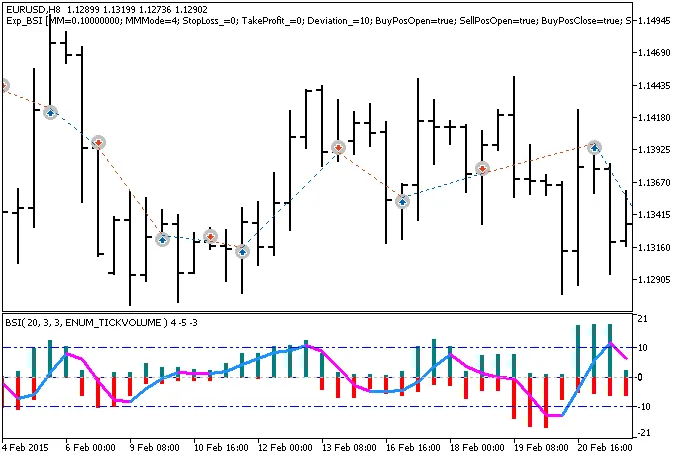
Fig. 1. Trade examples on the chart
Here are the testing results for 2015 using the EUR/USD pair on an H8 timeframe:
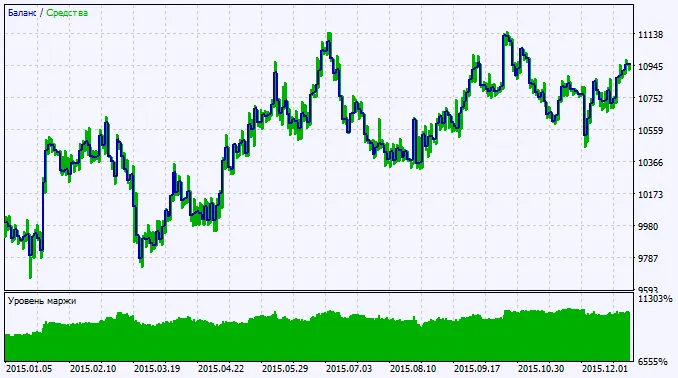
Fig. 2. Chart of testing results




Comments 0