
Looking to enhance your trading strategy? The XMA Range Channel trading system is built on the reliable signals from this innovative indicator. It generates a signal when a candlestick closes, particularly when the color shifts from neutral to lime green or pink/purple. This indicates a breakthrough in the channel defined by the indicator lines, giving you a solid entry point for trades.
To get started, ensure you have the compiled indicator file XMA_Range_Channel.ex5 installed. Just drop it into your <terminal_data_folder>\MQL5\Indicators folder, and you’re good to go!
One of the standout features of this Expert Advisor (EA) is its compatibility with brokers offering nonzero spreads. Plus, it allows you to set your Stop Loss and Take Profit right when you open a position. If you’re interested in exploring more options, check out the Trade Algorithms library for additional resources.
The testing results below were conducted using the default input parameters of the EA, with no Stop Loss or Take Profit included during the tests.
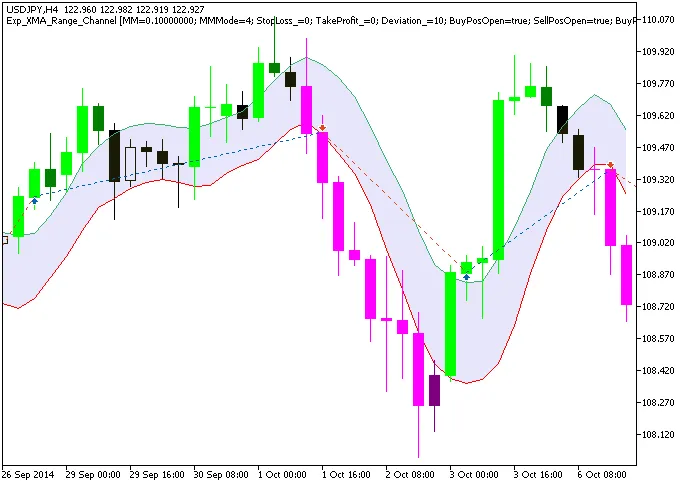
Fig. 1. Trade examples on the chart
Here are the testing results for 2014 on the USDJPY H4 timeframe:
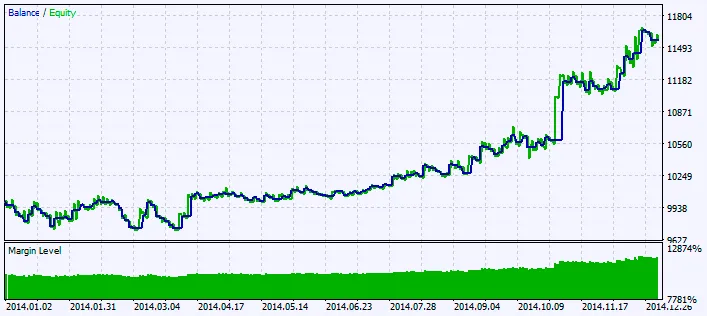
Fig. 2. Chart of testing results




Comments 0