
Hey fellow traders! Today, I'm excited to share my thoughts on a nifty Expert Advisor (EA) that’s based on two lines of the Moving Average. I came up with the idea, but the coding genius behind it is Sergey Diubakin.
This EA was put to the test on a PAMM account, and while I contributed to a net profit of 20%, the potential was there for much more—up to 84% of the initial deposit. Just goes to show, the human factor can sometimes mess things up!
Real Trading Period: From 23.02.2015 to 23.07.2015.
From my experience, this EA works best with a significant starting deposit, ideally between £15,000 and £20,000.
The EA utilizes the Moving Average indicator values for its strategies. If the fast Moving Average (MA) line sits above the slow MA line, and the gap between them is as specified, a buy order kicks off. Conversely, for sell orders, the opposite conditions apply. The EA closes orders based on the Moving Average values as well.
This EA also comes packed with additional modules, including:
- Distance between fast and slow MA lines
- Take Profit and Stop Loss settings
- Trailing Stop functionality
- Order spacing (up and down)
- Averaging methods for Take Profit
- Trading time settings
- Lot size adjustments based on previous losses
How the EA Operates:
- The EA first checks for any previously opened orders.
- If there are no open orders, it analyzes the chart and, if conditions are met, opens the first main order.
- The EA then sets the Take Profit and Stop Loss levels, if activated.
- Should the first order close at a loss, the next order can be opened with a larger size.
- If the first order is placed and the Step Up and Step Down modules are activated, further orders may be placed when the price hits specified levels, but only if the EA has opened previous orders.
- This EA features two operational modes:
- a) Mode 1: If the Fast MA is above the Slow MA, buy orders are placed. When the trend reverses, all orders are closed, and sell orders are initiated.
- b) Mode 2: If there are open buy orders when the trend changes, those orders stay open. Sell orders are only placed when all open orders are closed.
- The Trade Time module allows the EA to place the first order only during a specified time frame, but additional orders will still be processed regardless.
Expert Advisor Settings:
- Operation mode:
- 1 — Closes all open orders and places opposite orders on trend changes;
- 2 — Keeps open orders until they hit Take Profit or Stop Loss.
- Fast & Slow MA: Customize settings for the Moving Average plugin.
- Initial Lot:
- Allows the user to choose between a constant lot size or a dynamic one based on deposit changes.
- Distance settings:
- Sets the necessary distance between Fast MA and Slow MA for order placement.
- Take Profit and Stop Loss:
- Sets desired profit levels and loss limits.
- Order Spacing: Enables the EA to set intervals between orders in either direction.
- Trade Time: Module for specific trading times.
Trade Results:
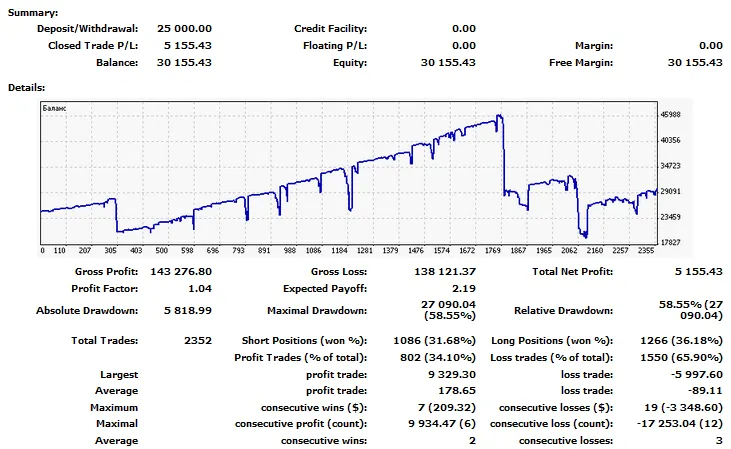
The EA's real trading period showed that while the maximum profit was 84%, my own interference resulted in a net profit of only 20%. Testing demonstrated potential monthly returns of 5%, 10%, or even 15% with a maximum drawdown of 20%.
P.S. The settings provided are tailored to my specific account. You'll need to customize them for your broker and account type. Don't get too caught up in optimization; it doesn't always help and can hinder order placement during volatile movements.




Comments 0