
Hello, fellow traders!
If you've been following my posts, you might have come across my Combo Trader. Well, I’m excited to introduce another version that works seamlessly with your trading strategies!
This EA is perfect for anyone looking to enhance their trading tactics.
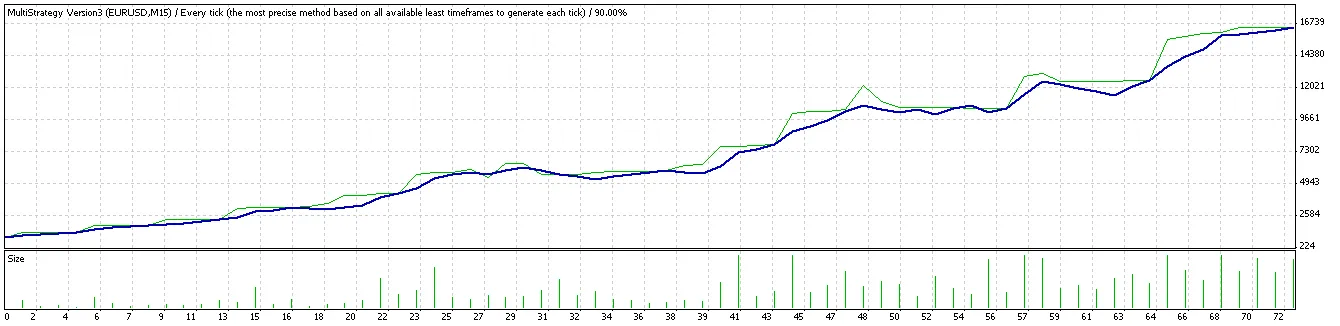
After receiving numerous requests, I’ve revamped the code to make it more user-friendly for all of you!
New Features to Explore
- Noise Filter: Integrate the Damiani_volatmeter indicator for a smoother trading experience (make sure to download it and place it in your \\experts\indicators folder).
- Current Trend Display: See the trend conditions directly on your chart.
- Static Lots Option: Choose to use static lot sizes by setting use_static_loss to true.
- Static Take Profit & Loss: You can now define fixed take profit and loss levels.
- Noise Closing Mode: Automatically close all positions if profit falls below noise loss.
- MACD Choices: Switch between classic MACD or Zero Lag MACD by adjusting the settings.
- Trend Detection: Utilize ADX for trend detection by entering the ADX_PERIOD and ADX_MAINLEVEL.
- Profit Protection: Set a Profit_to_close value to secure your gains.
- Loss Control: Limit your losses with Loss_to_Close to safeguard your account.
- Trading Cancellations: Automatically stop trading for the day if all positions close due to profit or loss controls.
- Noise Filtering on Entry: Prevent opening new positions during market noise.
- Indicator Signals: Visualize all indicator signals on your chart or just the latest one.
- Bollinger Bands Trading: This EA can now trade using Bollinger Bands in range-bound markets (set Use_BBand to true).
- Multi-Timeframe Capability: Set different timeframes for all indicators; just enter a value between 1 to 6.
Here’s how the timeframes break down:
- 1: 1-minute timeframe
- 2: 5-minute timeframe
- 3: 15-minute timeframe
- 4: 30-minute timeframe
- 5: 1-hour timeframe
- 6: 4-hour timeframe
And there are plenty of other exciting settings to explore!
I've included a detailed manual for your convenience. To install this EA, simply copy all files from the Indicators.zip to the experts\indicators folder where MetaTrader is installed, and place Multi-Strategy@FSF.mq4 in your experts folder.
For optimization, treat it like any EA to find the best take profit, stop loss, and other settings.
And hey, if you find yourself raking in profits with this EA, a little gift or donation wouldn’t hurt! 😄




Comments 0