
Are you looking to enhance your trading strategy? The Exp_ATR_Trailing EA for MetaTrader 5 is a game changer. This Expert Advisor automatically adjusts your Stop Loss based on the ATR_Trailing channel. It only modifies the Stop Loss when there’s a new bar, ensuring that it’s always in line with the latest price action.
This EA also makes things super convenient by displaying the ATR_Trailing indicator directly on your chart. No need to manually install the indicator anymore; once you load the EA, the indicator pops up automatically, reflecting the same parameters!
Here’s a quick look at the code that allows you to implement this nifty feature:
//+------------------------------------------------------------------+//| Inclusion of CChart class in expert                                  |//+------------------------------------------------------------------+#include <Charts\Chart.mqh>//---- declaration of a global variable as CChart type
CChart cchart;
//+------------------------------------------------------------------+//| Expert initialization function                                      |//+------------------------------------------------------------------+intOnInit()
  {
//---- getting handle of the ATR_Trailing indicator
   InpInd_Handle=iCustom(Symbol(),PERIOD_CURRENT,"ATR_Trailing",Period_ATR,Sell_Factor,Buy_Factor);
   if(InpInd_Handle==INVALID_HANDLE) Print(" Failed to get handle of ATR_Trailing indicator");

//--- resetting error code to zero
   ResetLastError();

//--- cchart object works with the current chart (ID=0) , the expert is attached to
   cchart.Attach(0);

//---- adding of ATR_Trailing indicator on the chart
   if(!cchart.IndicatorAdd(0,InpInd_Handle)) Print(" Failed to add ATR_Trailing indicator on the chart");
}
Expert Advisor Input Parameters:
//+----------------------------------------------+//| Expert Advisor input parameters              |//+----------------------------------------------+inputint Period_ATR=14;  // ATR periodinputdouble Sell_Factor=2.0;
inputdouble Buy_Factor=2.0;
inputuint Deviation=10;  // slippage
Visual Example:
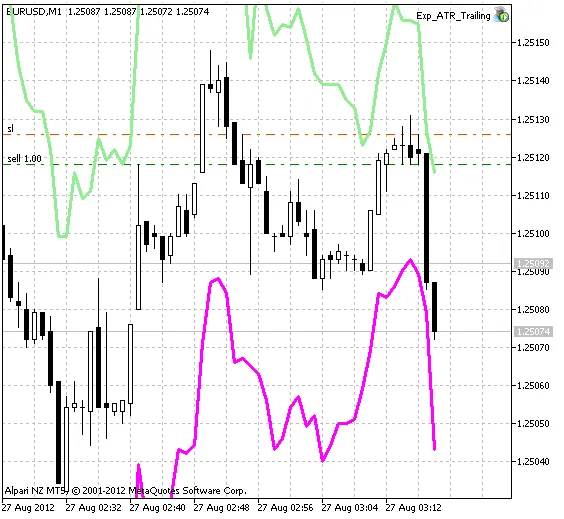
Exp_ATR_Trailing working chart




Comments 0