
Hey fellow traders! Today, I want to introduce you to a versatile trading system designed for MetaTrader 5 that can really amp up your trading game. This system utilizes the ColorSchaff JJRSX Trend Cycle indicator, and it offers two identical setups for both long and short trades, all within a single Expert Advisor (EA). The beauty of this EA lies in its flexibility—the volume of your upcoming trades can adapt based on the outcomes of previous trades.
Understanding the Input Parameters
To help you get the most out of this EA, the input parameters are neatly categorized into two main groups:
- Parameters with names starting with L are for managing long positions;
- Parameters starting with S are for managing short positions.
//+----------------------------------------------+//| Input parameters of the EA for long trades   |//+----------------------------------------------+
magic numberinputuint    L_Magic=777;          //L magic number//+----------------------------------------------+//| Input parameters of the EA for short trades  | //+----------------------------------------------+inputuint    S_Magic=555;          //S magic number
Each of these trading systems operates independently thanks to their unique magic numbers. Remember, financial markets aren’t always symmetrical. You often need different parameters for trading in a rising versus a falling market. So, when setting up your EA, start by testing one trading system at a time while disabling the other using the appropriate switches.
inputbool L_PosOpen=true; //L permission to enter long positionsinputbool L_PosClose=true; //L permission to exit long positions
Once you've nailed down your long trades, repeat the process for the short system.
Managing Trade Volumes
The EA also includes blocks for managing the volumes of opened positions:
inputuint L_TotalMMTriger=5; //L number of the last Buy deals to calculate stop lossinputuint L_LossMMTriger=3; //L number of losing Buy deals to reduce MMinputdouble L_SmallMM=0.01; //L Share of a deposit in a deal in case of lossinputdouble L_MM=0.1; //L Share of a deposit in a deal during normal tradinginput MarginMode L_MMMode=LOT; //L lot setting mode
And for the short positions:
inputuint S_TotalMMTriger=5; //S number of the last Sell deals to calculate stop lossinputuint S_LossMMTriger=3; //S number of losing Sell deals to reduce MMinputdouble S_SmallMM=0.01; //S Share of a deposit in a deal in case of lossinputdouble S_MM=0.1; //S Share of a deposit in a deal during normal tradinginput MarginMode S_MMMode=LOT; //S lot setting mode
This means that if you have five trades, and three of them are losers, the EA will open the next trade in the same direction with a volume of 0.01 lot. If there are fewer than three losing trades, the position volume increases to 0.1 lot.
For the EA to run smoothly, make sure the compiled JJRSX.ex5 and ColorSchaffJJRSXTrendCycle.ex5 indicator files are located in <terminal_data_directory>\MQL5\Indicators.
Backtesting Insights
The default input parameters of the EA were utilized during the testing phase, and it's worth noting that neither Stop Loss nor Take Profit were applied in these tests.
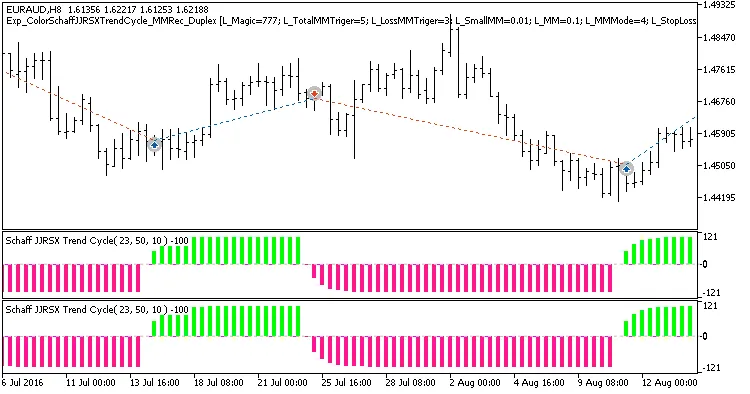
Fig. 1. Examples of deals on the chart with symmetrical settings
Here are the results from testing in 2017 using the EURAUD H8 pair:
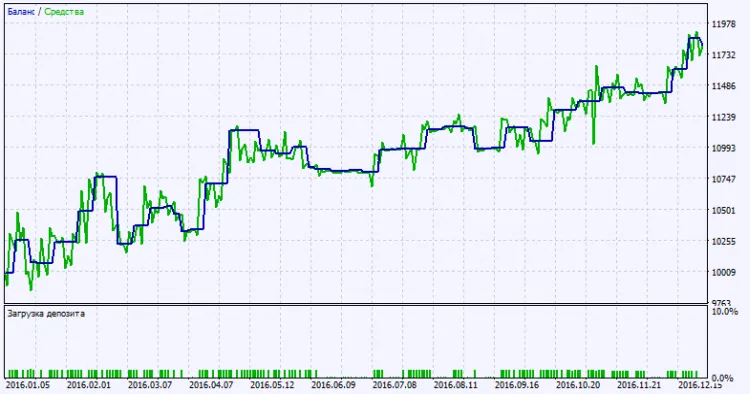
Fig. 2. Testing results chart
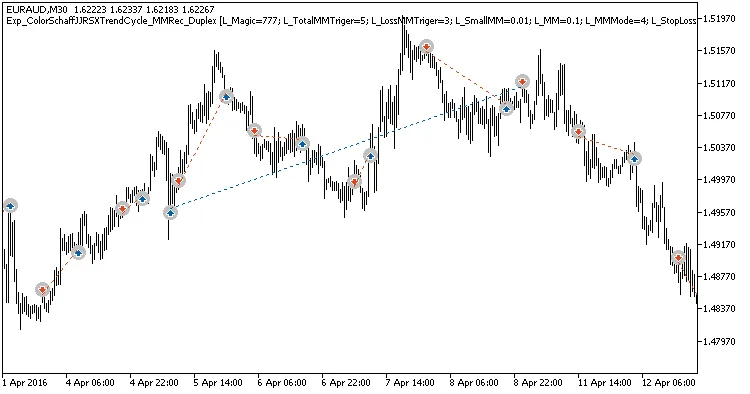
Fig. 3. Examples of deals on the chart with non-symmetrical settings




Comments 0