
If you're looking to streamline your trading experience, the Positions Change Informer is a game-changer. While it doesn't make trades on its own, think of it as your trusty sidekick designed to keep tabs on the status of your positions. This tool is a simplified version of the Expert Advisor discussed in the event processing article. The key difference? It leverages the OnTradeTransaction() function for monitoring Stop Loss and Take Profit triggers.
One of the standout features of this Expert Advisor is its ability to send email alerts, provided you have the correct settings. If email notifications are off the table, no worries—the EA will still keep you updated with alerts. Here are a few important points to keep in mind:
- It doesn't handle order modifications or deletions, focusing instead on opening, reversing, and closing trades.
- Stop Loss and Take Profit triggers are detected through broker comments. If your broker tweaks the default comments, you’ll only see information about the closing of a position and the resulting financial outcome in your deposit currency.
- If you want messages in a different language, you’ll need to create a translation file. For more details, check out this resource.
- This functionality is a breeze to integrate into other Expert Advisors—just copy the parameters, the code in the OnInit() function, and the necessary functions.
Setup Instructions:
- Download the PositionsChangeInformer.mq5 files to your MetaTrader 5\MQL5\Experts folder.
- Download the LanguagesEnum.mqh and Translator.mqh files to the MetaTrader 5\MQL5\Include folder.
- Extract the language file archive to the MetaTrader 5\MQL5\Files\Languages folder.
Parameters:
- Alert Type - Choose your alert preference for incoming trades: Alert (standard alert), Sound (triggers a sound file and logs trade info), or Email (sends trade details to your email).
- Sound Filename - Specify the name of your sound file. This applies only if the previous setting is set to Sound. It can trigger any WAV file located in the MetaTrader 5\MQL5\Files folder. If no file exists, the default alert.wav from the MetaTrader 5\Sounds folder will play.
- Languages - Set the language for your generated messages. Currently, only Russian is available, but you can view messages in both Russian and English if you choose any other language.
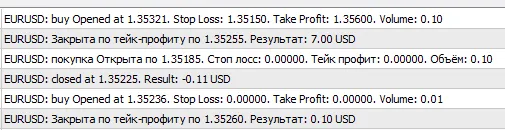
Check out the results in the journal (the output language parameter was altered simultaneously):




Comments 0