
If you’re looking to streamline your trading process, the Profit Loss Calculator for MetaTrader 5 is a must-have tool! Developed by the team at "motives" based on the CalculateProfit_EA system, this tool is designed not for executing trades, but for helping you visualize potential profits and losses ahead of time. Here’s what you can expect from this handy calculator:
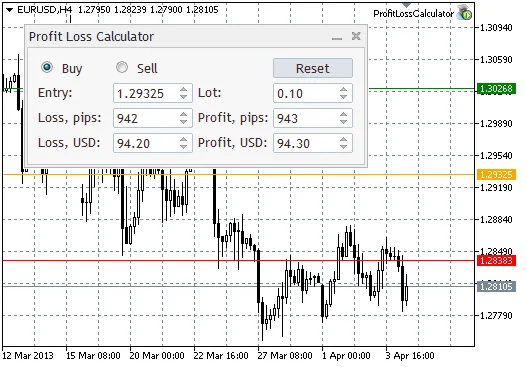
- Position Type Switching: Easily toggle between Buy and Sell positions with convenient radio buttons.
- Reset Button: Quickly reset all parameters to their initial settings, with the entry price positioned in the center of your chart window.
- Input Fields: Enter key data such as entry price (Entry), lot size (Lot), loss in pips (Loss, pips), profit in pips (Profit, pips), and their respective values in your deposit currency (Loss, USD and Profit, USD). If your account isn’t USD-based, it’ll display your local currency, like EUR.
- Visual Indicators: The calculator features clear lines for your entry (in orange), Stop Loss (in red), and Take Profit (in green).
How to Set It Up:
To get started, download all files into your Experts folder. It’s best to create a dedicated folder, like ...\MetaTrader 5\MQL5\Experts\ProfitLossCalculator, to keep things organized.
Usage Instructions:
- Switching deal types updates all parameters automatically.
- Adjusting the lot value recalculates profit and loss in monetary terms, while also determining the minimum and maximum allowable values.
- To change the entry point, you can either move the entry line, modify the price in the line’s properties, or adjust the Entry field.
- Adjusting Stop Loss or Take Profit levels is straightforward: move the corresponding line, update the properties, or tweak the values in the fields. Changes in price will recalculate values in both pips and monetary terms.
This panel is especially useful for traders setting stops and targets based on price levels or those calculating stop levels based on acceptable loss limits for individual trades.
Key Features:
- The panel is designed to work within the minimum and maximum prices displayed on your chart, ensuring that your entry price values and profit/loss calculations are accurate.
- Minimum pip values correspond to the stop level of the current symbol, with monetary minimums calculated accordingly.
- If you enter an incorrect price value, nothing will change, keeping your calculations safe.
- When values in pips or monetary fields exceed limits, they will automatically revert to the maximum or minimum allowable values.
- The entry line must remain between the Stop Loss and Take Profit lines—attempting to move it outside these bounds will revert it to its previous position.
- If you change your chart’s timeframe or symbol, be aware that data may not load correctly. If issues arise, simply hit the Reset button.
- If you accidentally delete a line, reconfigure the Expert Advisor. Restoring lines can create visual clutter, so it’s best to set them up fresh.
Additional Insights:
This calculator utilizes a custom CDoubleSpinEdit class, enhancing functionality with features like:
- The ability to set double-type values with precision.
- Direct entry of values into fields, not just increments/decrements.
- Customizable increment/decrement values.
- All parameters can be easily adjusted using the SetParameters(double value, double min, double max, double step, int digits) method.
This tool could be a game-changer for your trading strategy!




Comments 0