
Hey there, fellow traders! If you’re looking to elevate your trading strategy, let me introduce you to the Hedg System Expert Advisor (EA). This nifty tool employs a hedging strategy, allowing you to execute both buy and sell trades simultaneously. It shines on the 1D time frames with major forex pairs.
There are two versions of this EA you might want to check out:
- Version 2: Random Hedg – This version comes equipped with a trailing stop loss and break-even functions.
- Be sure to test it on a demo account first before diving in!
- Remember, this EA operates based solely on the price of the open candle.
Input Settings
- Use_TP_In_Money - Activate Take Profit in money (true/false).
- TP_In_Money - Set Take Profit in money (values between 10-100).
- Use_TP_In_Percent - Activate Take Profit in percent (true/false).
- TP_In_Percent - Set Take Profit in percent (values between 10-100).
- ------------[Money Trailing Stop for Multiple Trades]----------------------
- Enable_Trailing - Enable trailing with money (true/false).
- Take Profit In Money (current currency) (values between 25-200).
- Stop Loss In Money (current currency) (values between 1-20).
- --------------------------------------------------------------------------------------
- Lots - Specify lot size (values between 0.01-10).
- MaximumRisk - Set maximum risk from total margin in % (values between 0.01 - 0.3).
- If "MaximumRisk = 0," then "Lot = constant".
- DecreaseFactor - Set decrease from total margin if you lose a trade.
- Stop_Loss - Set stop loss (values between 10-100).
- MagicNumber - Assign a magic number (values between 1-100000).
- TakeProfit - Set take profit (values between 10-100).
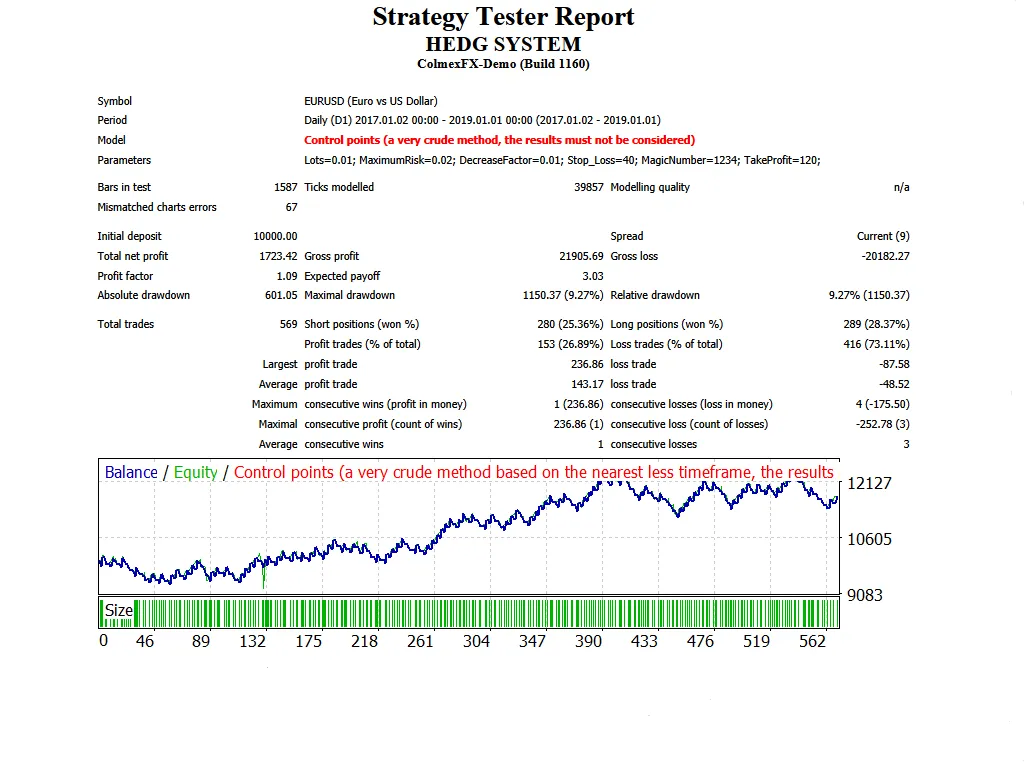
Don’t forget to optimize this EA every few months, using the same inputs mentioned above. You can use it as a hedging grid EA or as a single trade EA.
Curious about how to perform a backtest? Check out this link for a step-by-step guide: Backtest Guide.




Comments 0